
Your Guide to Flipping Soul Music Samples in FL Studio
Soul music samples are the secret sauce behind more hit records than you can count. They offer this incredible palette of emotion, warmth, and texture that just instantly gives a modern beat some life. Producers grab these sounds—everything from lush Rhodes chords to those perfectly gritty drum breaks—to inject some authentic character and nostalgic depth into hip-hop, R&B, and lo-fi tracks.
Why Soul Music Samples Elevate Modern Beats

There’s a good reason producers keep coming back to the soulful sounds of the past, and it’s not just about nostalgia. It’s really about the raw, unfiltered emotion that was captured in those original recordings. A simple four-bar loop can lay down a complete musical foundation that just feels alive and human.
Think about the sonic fingerprint of classic soul. It’s all about those warm, round basslines that anchor the groove, vocal runs dripping with passion, and iconic drum breaks with that unmistakable swing. These elements bring an immediate sense of authenticity that’s incredibly hard to replicate with perfectly clean digital instruments. When you drop a soul sample into a track, you’re basically importing decades of musical history and feeling.
The Timeless Appeal of Soul Textures
The sonic DNA of soul music gives producers a powerful head start. It’s like a shortcut to a specific mood that connects with listeners on a much deeper level.
What makes it so special?
- Emotional Resonance: Soul music is literally built on raw feeling—heartbreak, joy, struggle—and all of that emotion is baked right into every single note of a sample.
- Warmth and Saturation: The analog recording gear of that era—we’re talking tape machines and vintage preamps—gives these sounds a pleasing warmth that modern plugins are constantly trying to copy.
- Groove and Swing: The live instrumentation provides a natural, human rhythm. It feels less rigid and robotic than programmed beats, adding an irresistible bounce to your tracks.
For a producer, finding the right soul sample is like discovering a hidden story. Your job is to retell that story in a new context, blending its timeless character with your own modern vision.
A Foundation for Modern Genres
This timeless quality is exactly why soul is one of the most sampled genres in music history. It’s the engine powering countless hip-hop and R&B hits that still dominate the charts today. Industry data consistently shows R&B and soul/funk as top sources for samples in modern productions. If you’re curious, you can discover more insights about music sampling trends and see just how popular it is.
Ultimately, using soul music samples lets you build on a foundation of proven musicality. And with royalty-free options, like the ones you’ll find in FL Studio Sound Packs, you get access to this rich heritage without the legal headaches of trying to clear classic records.
Finding and Choosing Your Perfect Soul Sample
We’ve all been there—staring at a screen, drowning in a sea of sample pack folders. The first real step to flipping incredible soul music samples isn’t just finding them; it’s learning how to listen. Moving past the endless scroll means training your ear to hear the potential buried inside a sound.
Starting with curated libraries is a game-changer. They do the heavy lifting for you, offering high-quality, royalty-free sounds that are already organized and cleared for commercial use. This approach saves you the massive headache (and legal risk) of crate-digging through old vinyl.
The best libraries give you options not just in sound but in format, which is where you unlock maximum flexibility as a producer.
Listening for Hidden Potential
The real art of sample selection isn’t about grabbing the first cool loop you hear. It’s about spotting the smaller, usable gems within that loop. A full four-bar phrase is nice, but the real magic often lives in the details.
Train your ear to pick out these hidden treasures:
- Isolated Horn Stabs: That quick, punchy brass hit? It could become the perfect punctuation for your beat’s transitions.
- Unique Vocal Runs: A single, soulful ad-lib can be chopped, pitched, and turned into a brand-new melodic hook.
- Clean Drum Breaks: Even just two clean bars of a drum groove are enough to loop, slice, and resequence into your track’s entire rhythmic foundation.
- Instrumental Textures: Don’t ignore the quiet moments—the subtle decay of a Rhodes chord or the authentic sound of fingers sliding on a bass string can add incredible texture.
When you’re auditioning samples, try to mentally filter out the full arrangement. Zone in on one instrument at a time and ask yourself, “Can I build a completely new idea around just that one sound?” This mindset is what separates a beat-filler from a true beat-maker.
For instance, a pack might have a full keyboard loop with bass and drums. While the whole thing grooves, maybe the real star is that subtle electric piano melody weaving through it. Libraries like FL Studio Sound Packs have tons of inspiration—these Urban Classic Keyboard Loops are a perfect place to hunt for those core melodic ideas. The goal is to find sounds that genuinely spark a new track, not just fill up space.
Understanding Different Pack Formats
Grabbing the right tools for your specific workflow makes a huge difference. Not all sample packs are built the same, and understanding the format helps you invest your time and money wisely.
Before you download, think about what you’re trying to achieve. Are you building a beat from the ground up or just looking for a quick melodic idea? The answer will guide you to the right type of pack.
Choosing Your Soul Sample Pack Format
A producer focused on intricate, original melodies might want MIDI files to have total control, while a beatmaker looking for a fast start could benefit more from a full construction kit. This table breaks down what you get with each format.
| Pack Type | Best For | Creative Control | Learning Value |
|---|---|---|---|
| One-Shots | Building custom drum kits and melodic patterns from scratch. | High | Moderate |
| Loops | Quickly establishing a groove or melodic foundation. | Moderate | Low |
| Stems | Deconstructing a full track to isolate specific instruments. | High | High |
| Construction Kits | A complete package with loops, stems, and MIDI for one beat. | Very High | Very High |
Construction kits, in particular, are an incredibly powerful resource. They essentially deconstruct a finished track into its individual components—bass, drums, melody, and more. This lets you see exactly how professional arrangements are put together.
You can grab the bassline from one kit, swap in your own drums, and build a completely new song from a solid, proven foundation. It’s an approach that delivers immediate results while teaching you invaluable production techniques along the way.
Your FL Studio Workflow for Manipulating Samples
Alright, this is where the real fun starts. You’ve dug through the crates and found that perfect soul sample. Now it’s time to bring it into FL Studio and make it your own. We’re not going to wade through generic tutorials here; this is a straight-up, practical workflow for turning that raw sound into the heart and soul of your next beat.
First thing’s first: you have to get the sample playing in time with your project. This is a non-negotiable, foundational skill. A tiny timing mismatch can completely derail the groove of a track, making everything feel sloppy and disconnected.
Getting Your Sample in Time and in Key
For most loops, the Channel Sampler is your best friend. Just drag your sample in and look for the Time stretching section. I usually find the “Stretch” algorithm is the best starting point for melodic stuff because it keeps the pitch intact while changing the tempo. Just right-click the “Time” knob, hit “Autodetect,” and pick something like “Project tempo.” Boom—it’s synced.
But getting it in time is only half the battle. It has to be in key. A sample that clashes with your other instruments is going to sound amateur, no matter how fire it is on its own.
If you’re not sure what key the sample is in, Newtone is the tool for the job. Load the sample into an instance of Newtone, and it’ll analyze the audio and lay out all the notes for you. This gives you a crystal-clear visual map of the melody, so you can figure out the root note with confidence.
Once you know the key, pitching it to match your track is easy.
- Channel Sampler Pitch Knob: For quick and simple adjustments, the main pitch knob in the Channel Sampler is perfect. Use this to shift the whole thing up or down by semitones.
- Newtone for Surgical Pitching: What if only a couple of notes are clashing? You can fix them individually right inside Newtone without messing with the rest of the sample.
- Edison for Advanced Warping: For more complex timing problems or if you want to get creative with stretching effects, Edison’s time-stretch and pitch-shift tools give you much deeper control.
The goal isn’t just to make the sample fit; it’s to make it groove. Sometimes, pitching a soul sample down a few semitones not only matches your key but also gives it a darker, moodier texture that completely changes the vibe of your beat.
The Art of Chopping Soul Music Samples
Now we get to the most creative part—chopping. This is how you take a simple loop and flip it into a completely new melodic phrase. Chopping soul music samples is the signature technique behind countless classic hip-hop tracks, and FL Studio gives you a couple of killer ways to do it.
Slicex for Automatic Precision Slicex is built for speed. It automatically finds the transients—the little peaks at the start of each sound—and maps each slice to a different key on your piano roll.
This is a lifesaver for drum breaks or rhythmic loops because it does all the tedious cutting for you. You can immediately start jamming on your MIDI keyboard to find new patterns and rhythms hiding in the sample. For a deeper look at this workflow, our guide on making beats with FL Studio covers these core techniques in more detail.
Playlist Chopping for Creative Freedom While Slicex is fast, nothing beats chopping manually in the Playlist for pure creative control. Grab the Slice tool (just press C) and start cutting the audio clip wherever it feels right, not just where the software tells you a transient is. This method is far more musical and lets you create chops that feel human, not robotic.
From there, you can rearrange these little audio clips on the timeline, messing with their order, timing, and even their pitch to build your hook. Honestly, this hands-on approach is where the magic happens. You’ll stumble upon happy accidents and create unique melodies you never would have thought to program in a piano roll.
Advanced Techniques for a Professional Sound
Getting a vintage sample to really punch through a modern, crowded mix is one of the biggest hurdles we face as producers. It’s about more than just chopping and looping; it’s about making that classic soul texture feel intentional and powerful next to heavy 808s and sharp hi-hats. These next few techniques are the little details that separate a decent beat from a truly professional track.
This simple workflow breaks down the core process into three fundamental stages.
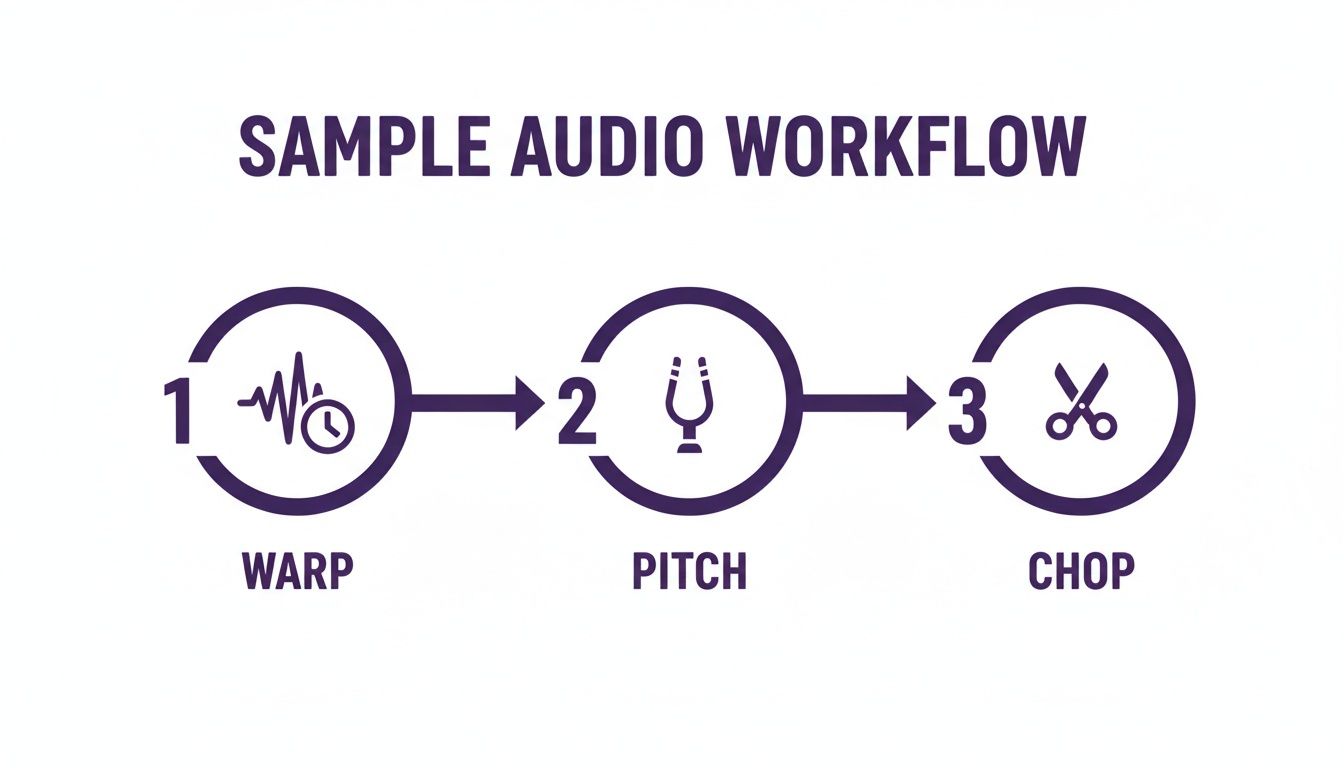
You need to get comfortable with these steps—warping, pitching, and chopping—before you can really dive into the more advanced stuff like layering and processing.
Creative Layering for Modern Weight
One common problem with soul music samples is their low-end. A vintage bassline might have an incredible groove, but it often gets completely lost once you bring in a hard-hitting kick. The solution? Creative layering.
Instead of trying to force the original bass, just tuck a clean, modern sub or 808 right underneath it. Use an EQ to filter out everything below 100 Hz on the soul sample to prevent a muddy mess, and let your 808 own that sub-bass territory. This trick gives you the best of both worlds: all the melodic character of the original performance with the physical weight of modern production.
You can apply the same idea to your drums. If a sampled snare feels a little thin or “dusty,” just layer a sharp, punchy one-shot right on top. You don’t need to drown out the original; just blend the new snare in quietly to add some transient punch and modern snap.
Extracting MIDI for Ultimate Flexibility
Ever loved the melody of a soul sample but wished you could use your own sound? FL Studio’s Newtone makes this incredibly easy with MIDI extraction. Honestly, this technique is a total game-changer, opening up a whole universe of possibilities.
Here’s my go-to workflow for this:
- Isolate the Melody: First, drag your soul sample into an instance of Newtone.
- Generate MIDI: Head to Newtone’s menu and click “Send to piano roll.” FL Studio will analyze the audio and spit out a MIDI pattern that matches the original melody.
- Assign a New Instrument: Just like that, you have the original melodic data ready to go in a piano roll. Now you can assign it to any VST you own—a lush pad, a sharp lead, or even a different electric piano sound.
This lets you layer the original sample with your new instrument for a much richer, more complex texture. You can even go in and edit the MIDI notes, changing up the rhythm or harmony to make the melody completely your own while still holding onto the soulful vibe of the original performance.
This MIDI extraction method is more than just a technical trick; it’s a bridge between old and new. It lets you translate the human feel of a classic performance into a format you can fully control with modern tools.
Processing Your Sample to Fit the Mix
Finally, let’s talk about processing. A raw sample almost never sits perfectly in a mix right out of the box. The goal here is to shape the sound so it complements everything else, especially your drums and vocals.
- Surgical EQ: Grab an equalizer like Fruity Parametric EQ 2 to carve out some space. If the sample is fighting with your vocals, try making a small cut in the 1-3 kHz range on the sample. This creates a neat little “pocket” for the vocals to sit in, making everything clearer.
- Tasteful Saturation: To add some warmth and vibe, a plugin like Fruity Blood Overdrive works wonders. Just be subtle with it. You’re trying to gently color the sound and bring out some harmonics, not obliterate it with distortion.
- Sidechain Compression: This is key for getting your sample to groove with your drums. Route your kick drum to the sample’s mixer track, then use the Fruity Limiter in compression mode. This will “duck” the sample’s volume a tiny bit every time the kick hits, creating that classic pumping effect that adds bounce and rhythm.
Arranging Your Beat and Understanding the Legal Side
That fire eight-bar loop you just cooked up? It’s a great start, but it’s not a finished track. The real craft begins now, turning that initial spark into a fully structured beat with dynamics, tension, and release. This is where arrangement truly separates the pros from the hobbyists.
Don’t fall into the trap of just copying and pasting your loop for three minutes straight. Think like a storyteller. Your verse might call for a more stripped-back version of your sample chops, giving the vocalist space. Then, when the chorus hits, you can bring back that full, energetic pattern for a massive lift.
A classic trick for building vibe is using filters, especially for intros and breakdowns. Try automating a low-pass filter to slowly open up on the sample at the start of your track—it’s an instant way to build anticipation. You can do the reverse for a breakdown, creating a smooth transition that gives the listener’s ears a rest before the beat drops back in hard.
The Critical Difference in Sample Sources
Alright, let’s talk about the less glamorous but absolutely essential part of using soul music samples: the legal side. This is where so many talented producers get tripped up, and a simple misunderstanding can have some serious consequences down the line.
You have to grasp the fundamental difference between sampling an old, copyrighted record and using a modern, royalty-free sample pack. Legally, they are two completely different worlds.
- Sampling Copyrighted Records: When you lift a piece of audio from a classic soul track, you’re not just taking one sound—you’re sampling two distinct copyrights. You need permission for both the master recording (usually owned by the record label) and the publishing rights (owned by the songwriters). This process, known as “clearing a sample,” is often expensive, incredibly time-consuming, and frequently impossible to secure.
- Using Royalty-Free Packs: When you download a sound from a curated library, you’re not sampling—you’re licensing. You’re essentially buying a legal right to use that sound in your own commercial music, and the best part is you won’t owe any additional royalties to the original creators.
Using royalty-free sounds is about creative freedom and peace of mind. It means you can sell your beats, upload your music to streaming services, and build your career without constantly looking over your shoulder for legal claims.
Staying Safe and Focusing on Creativity
For any producer planning to release music commercially, the choice is pretty clear. Sticking with pre-cleared, royalty-free soul music samples is by far the safest and most efficient path forward.
It completely removes the legal guesswork from your process, letting you focus 100% on your craft. You can chop, flip, and arrange with total confidence, knowing that you own the rights to your finished creation.
Of course, every sample pack provider has its own specific terms, so it’s always smart to know what you’re agreeing to. You can check out our own licensing policies by reading the FL Studio Sound Packs terms and conditions to see exactly how our royalty-free model protects you. This knowledge is power, and it lets you build your music catalog securely.
Common Questions About Using Soul Samples
Once you start digging into soul samples, you’ll inevitably run into a few creative roadblocks. It happens to everyone. Knowing how to push through these common issues can be the difference between a frustrating session and a finished beat you’re proud of.
One of the biggest hurdles producers face is trying to make a warm, vintage sound feel at home in a modern, aggressive track. How do you get that old-school vibe to work with something hard-hitting like trap or drill? Let’s break it down.
How Can I Make a Soul Sample Fit a Genre Like Trap or Drill?
This is all about contrast and heavy-handed processing. You’re not just looping a sample; you’re forcing it to serve a totally new rhythmic and sonic purpose.
First thing’s first: tempo. You’ll want to time-stretch the sample way up, usually into the 140-160 BPM range common for these genres. Then, pitch it down. This combo immediately creates that darker, more sinister mood you’re looking for.
Next, get aggressive with an EQ or a low-pass filter. Roll off all those high frequencies. This does two things: it gives the sample a muffled, underwater feel and, more importantly, carves out a ton of space for your modern drums. Now your sharp hi-hats and cracking snares have room to slice through the mix.
Forget using long, melodic phrases. Chop the sample into short, rhythmic stabs. Think of them less as a melody and more as a percussion element. Then, build a new pattern with these chops. The final piece of the puzzle is to surround this vintage texture with unapologetically modern sounds—booming 808s, machine-gun hi-hat rolls, and maybe a stutter effect like Gross Beat to give it that intense, energetic bounce.
What Should I Do If My Chopped Sample Sounds Too Repetitive?
A simple two-bar loop gets old fast. The key to breaking up the monotony is creating variation and evolution in your arrangement.
Your goal is to make the loop feel like it’s evolving, not just repeating. Use one pattern of chops for the verse and introduce a more dynamic, complex pattern for the chorus to create a lift in energy.
Another trick I use all the time is introducing tiny changes every eight bars. It doesn’t have to be anything drastic. Try reversing a single chop just before the next section hits, or automate a slow filter sweep to open up over the course of a verse. Even just panning one of the chops from left to right can keep the listener’s ear engaged.
Layering is your best friend here, too. A simple synth counter-melody or a subtle texture tucked underneath the main loop can make a world of difference, adding depth without cluttering the beat.
Are Royalty-Free Soul Samples Really Free for Commercial Use?
For the most part, yes, but you absolutely have to read the license agreement for every single pack you download. No exceptions. Reputable sites and sound designers will grant you a license to use their sounds in your commercial releases without demanding a cut of your earnings. This means you can sell your beats, upload to Spotify, and collect your streaming revenue worry-free.
However, “royalty-free” never means you can just re-package and sell the raw, isolated samples yourself. Always check the fine print, as some licenses might have different rules for major label placements versus independent releases. It pays to be careful.
Ready to start flipping without the legal stress? FL Studio Sound Packs gives you unlimited access to thousands of royalty-free soul samples, construction kits, and MIDI files to fuel your creativity. Find your perfect sound today at https://www.flstudiosoundpacks.com.