
Your Ultimate Guide to Royalty Free Drum Loops in FL Studio
Let’s be real for a second. The term “royalty-free” gets thrown around a lot, and it can be confusing. So, what are royalty free drum loops? Simply put, they are professionally recorded rhythm patterns you buy once and can legally use in your music forever—without ever paying ongoing fees or royalties.
For producers grinding it out in FL Studio, this is everything. It’s your ticket to building professional-sounding beats with high-quality sounds, all without getting tangled up in complicated legal knots.
What Royalty Free Drum Loops Actually Mean For Producers
Let’s cut through the legal jargon. When you see “royalty-free,” think freedom. Creative freedom and financial freedom. It doesn’t mean the loops are free of cost; it means they are free from any future royalty payments down the line.
Here’s an analogy: Imagine you’re building a house. You could rent a power drill for every single task, paying the rental company each time. Or, you could just buy the drill once and use it on any project you want, forever. Royalty free drum loops are like buying the drill. You pay once, and that loop becomes a permanent tool in your creative arsenal.
This model completely changed the game, especially for independent artists and bedroom producers. Before royalty-free licensing became the norm, using a pre-existing piece of audio—a “sample”—was a legal minefield. Producers had to “clear” the sample, a process that was often crazy expensive and took forever.
The Old Way Vs. The New Way
In the old days, clearing a sample meant hiring lawyers, hunting down the original copyright holders, and negotiating complicated, expensive deals. This system put up huge walls, making professional-sounding tracks an exclusive club for producers with major label backing.
The royalty-free model smashed those walls to pieces. It leveled the playing field, giving anyone with a DAW like FL Studio access to professional sounds. Now you can build tracks that can go head-to-head with the major players on a global scale.
This shift has had a massive ripple effect. The drum sample market is on track to hit an insane USD 2.49 billion by 2033. That number makes sense when you realize clearing just one sample could historically cost anywhere from $5,000 to $50,000. Today, royalty-free has flipped that script entirely. An estimated 95% of sales on platforms like BeatStars now involve loop-based production. You can dive deeper into the industry’s growth and the economics behind selling music samples online.
Think of it this way: The one-time fee you pay for a royalty-free drum loop isn’t just for the audio file. You’re buying a license—a legal agreement that gives you specific rights to use that sound in your own commercial music.
To make it even clearer, let’s break down the key differences between grabbing a royalty-free loop and trying to clear a sample the old-school way.
Royalty Free Vs Traditional Licensing At A Glance
| Feature | Royalty Free Loops | Traditionally Licensed Samples |
|---|---|---|
| Cost Structure | A single, affordable upfront fee. Predictable and budget-friendly. | Can be extremely expensive, often requiring large upfront advances plus ongoing royalty splits. |
| Usage Rights | Broad rights for commercial use, modification, and distribution. | Highly restrictive. Rights are negotiated on a case-by-case basis and can be very limited. |
| Legal Process | Simple and instant. Purchase grants immediate rights via a clear license agreement. | Complex and slow. Involves lawyers, negotiations, and tracking down multiple copyright holders. |
| Creative Freedom | Chop, edit, process, and layer without restriction. Make it your own. | Limited. Often comes with “do not alter” clauses or requires approval for any changes. |
| Ongoing Payments | None. You keep 100% of the royalties your song earns. | Yes. You have to share a percentage of your song’s future earnings with the original creator. |
This table really highlights why the royalty-free model has become the standard for modern producers. It’s about speed, affordability, and most importantly, creative control.
Your Creative Freedom
That license is the most important part of the deal. It’s the legal document that gives you the power to create without looking over your shoulder.
When you buy a high-quality royalty-free loop, you’re almost always granted the right to:
- Use it in commercial releases: Drop it in a track you sell on Spotify, Apple Music, or anywhere else.
- Modify and transform it: Chop, stretch, pitch-shift, and process the loop until it’s unrecognizable and completely yours.
- Keep 100% of your earnings: You never have to pay the original creator a dime from your song’s profits.
This freedom lets you focus on what really matters: making incredible music. Instead of stressing about surprise legal bills or getting a cease-and-desist letter, you can confidently build your sound library and produce tracks entirely on your own terms. It’s the foundation for a real, sustainable career as an independent producer.
Finding High-Quality Drum Loops for Your Genre
Hunting down amazing royalty free drum loops is more of an art than a science. It’s not about just typing “drum loops” into Google; it’s about training your ear like a seasoned producer and knowing what to look for, both technically and creatively. Think of yourself as a chef picking ingredients—the final track is only ever going to be as good as the raw materials you start with.
The first thing to check off your list is always the technical quality. A professional loop isn’t just a cool beat; it’s a flexible piece of audio that’s been properly engineered. That all starts with the file format.
The Non-Negotiable Technicals
For any serious production work, 24-bit WAV files are the gold standard, period. While a 16-bit file (like you’d find on a CD) is okay, a 24-bit file gives you way more headroom. This means you have a much wider dynamic range to play with, letting you compress, EQ, and add saturation to the loop without introducing a bunch of nasty noise or digital distortion.
A compressed MP3 file is like a photocopy of a photocopy. It might look okay from a distance, but the details are lost. A 24-bit WAV is the original high-resolution photograph, giving you a pristine canvas to work on.
Beyond the file type, you have to look at the metadata. Any professionally made loop should come clearly labeled with its BPM (beats per minute) and, if it has a tone, its key. This simple piece of information will save you hours of guesswork and frustration, allowing you to drag and drop the loop right into your project. Unlabeled files are a huge red flag.
- File Format: Always go for 24-bit WAV files. This gives you the most flexibility for processing and mixing.
- Metadata: Look for loops that are clearly labeled with BPM and key. It’s a massive time-saver.
- “Dry” vs “Wet”: If you can, find packs that give you both “dry” (unprocessed) and “wet” (with effects) versions. Dry loops give you total creative freedom.
Listening with a Producer’s Ear
Once you’ve got the technical stuff sorted, it’s time to actually listen—but you’re not just listening for a catchy rhythm. You need to imagine how that loop will sit inside a full track. This is where your genre knowledge really comes into play.
For a trap beat, you’re listening for a deep, rumbling 808 kick that has both weight and punch, along with sharp, clean hi-hats that you can easily slice into complex rolls. The snare needs that signature crack to cut through the mix. If you’re building a classic hip-hop track, you might dive into collections of hip-hop loops to find that perfect boom-bap vibe.
On the other hand, a house music loop needs a totally different vibe. The focus here is on a tight, four-on-the-floor kick, off-beat hi-hats that create a sense of forward motion, and little bits of percussion that add texture. The loop needs to feel alive and make you want to dance, not just hit hard.
What to Listen For Genre By Genre
| Genre | Key Drum Characteristics | What to Listen For |
|---|---|---|
| Trap/Hip-Hop | Punchy 808s, crisp hi-hats, sharp snares. | Does the kick have a clean sub-bass tail? Are the hi-hats well-defined enough to be chopped and rolled? |
| House/Techno | Tight four-on-the-floor kick, groovy percussion, driving open hi-hats. | Does the loop have a compelling groove? Is there space in the rhythm for other elements? |
| Lo-Fi | Dusty, saturated kicks, soft snares, vinyl crackle or tape hiss. | Does it sound authentically vintage? Is the texture pleasing or just noisy? |
| Pop/R&B | Clean, mix-ready kicks, layered claps and snaps, polished percussion. | Is the sound modern and polished? Will it sit well with clean vocals and synths without much processing? |
At the end of the day, a great loop should give you inspiration without boxing you in. It should be a solid starting point—a rhythmic foundation that you can build on, chop up, and make your own. When you combine a technical checklist with a sharp, genre-focused ear, you’ll start finding the kind of drum loops that can take your tracks from good to great.
Your Step-By-Step Guide to Using Loops in FL Studio
Alright, you’ve tracked down some killer royalty-free drum loops. Now for the fun part: bringing them to life inside FL Studio. This is where the real magic happens. It’s best to think of a loop not as a finished piece, but as raw clay you can mold into the perfect rhythmic backbone for your track.
The process is surprisingly simple, starting with a classic drag-and-drop. From there, we’ll build up your skills, moving from the essential tweaks to the more creative techniques that will make any loop sound like it was made just for you.
Getting Your Drum Loops into the Project
The easiest way to get started is to just drag your WAV file from the FL Studio Browser (or your computer’s file explorer) and drop it right onto the Playlist. This action creates an Audio Clip, which is just a visual snapshot of the sound wave that you can move around on your timeline.
Once it’s sitting in the Playlist, you can click and drag it to place it wherever you need it. Maybe you want it to kick off the track and set the main groove, or maybe you’ll save it for the energy boost in a chorus. This simple step is your gateway into working with audio inside the DAW.
Matching Tempo with Time Stretching
Let’s be real—it’s pretty rare for a downloaded loop to perfectly match the tempo of your project right out of the box. This is where FL Studio’s powerful time-stretching tools come into play. The goal here is to get the loop to follow your project’s BPM without turning it into a glitchy, robotic mess.
Here’s how to get a flawless tempo match every time:
- Set Your Project BPM: First things first, make sure your project’s tempo is set to the speed you want. You’ll find this in the main transport panel at the very top of the screen.
- Access the Channel Sampler: Double-click the Audio Clip in your Playlist. This opens up its Channel Sampler window, which is basically the control center for that specific sound.
- Adjust the Time Stretching Mode: In the Channel Sampler, find the “Mode” dropdown menu under the Time stretching section. For drums, you’ll usually get the best results with “Stretch” or “e3 generic.” These modes are great at preserving the sharp, punchy transients of your kicks and snares.
- Set the Time Knob: This is the easiest part. Just right-click the “Time” knob and choose “Autodetect.” FL Studio will quickly analyze the loop and automatically sync it right up to your project’s grid. You’ll literally see the clip in the Playlist stretch or shrink to fit the measures perfectly.
This quick process locks your loop into the song’s groove, giving you a tight, professional-sounding rhythmic foundation. If you want to dive deeper into building beats from the ground up, our guide on making beats with FL Studio is a great next step.
Producers are leaning on high-quality loops more than ever. The market for drum sample libraries—which is packed with royalty-free loops—is set to grow by a massive 8.6% each year, projected to hit USD 2.49 billion by 2033. This boom is driven by producers who need professionally made, 24-bit WAV loops to quickly build tracks that sound incredible. You can dig into more data on the drum sample market’s rapid expansion to see just how big this trend is.
This simple workflow shows how to quickly vet any new drum loop before you even start messing with it.
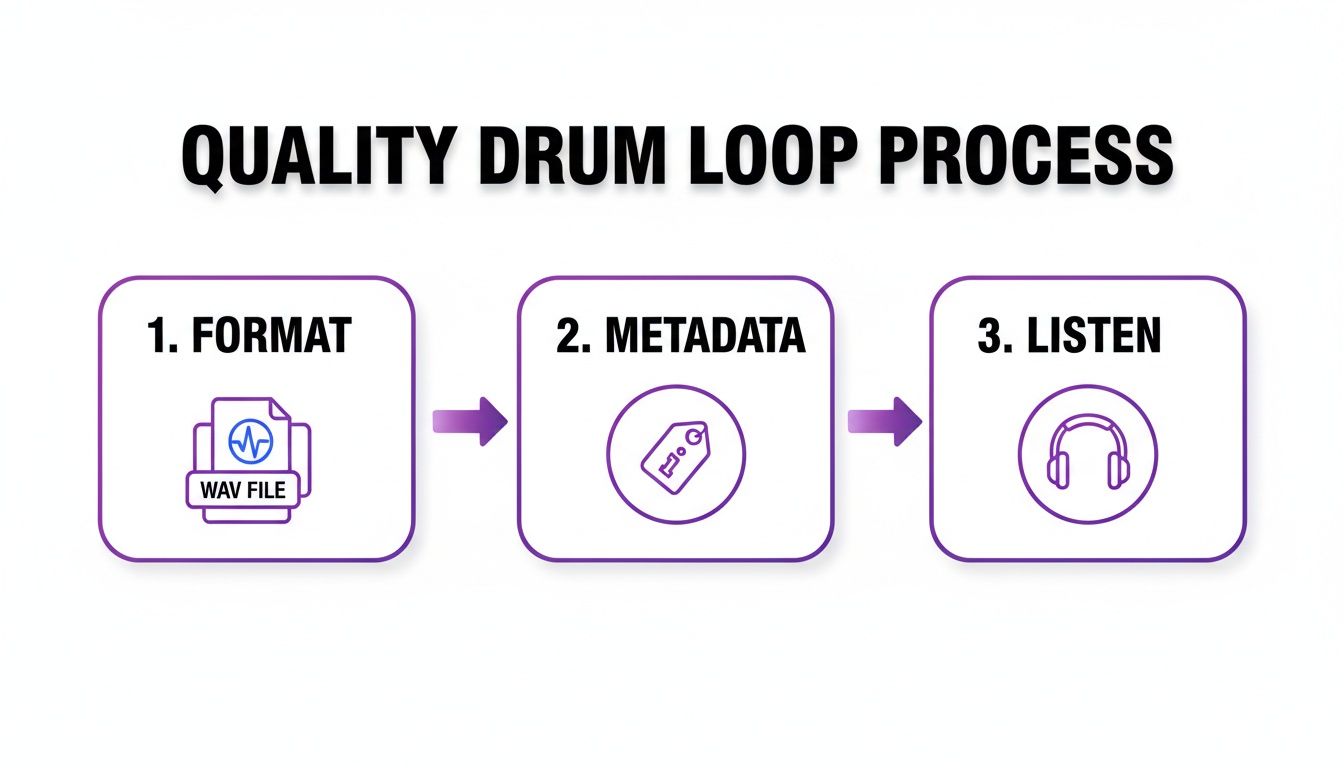
Running this three-step check ensures you’re starting with a solid asset, which saves you a ton of technical headaches down the line.
Pitching and Slicing for Creative Control
Now that your loop is perfectly in time, you can start shaping its actual character. Pitching the loop up or down can completely change its vibe. A dark, heavy beat can suddenly feel more energetic, or a light groove can be turned into something moodier.
Back in that same Channel Sampler window, you’ll find the “Pitch” knob. Even small tweaks here can help the drums sit better in the mix with your synths or bassline. Of course, making more extreme changes can lead to some really unique sound design effects.
But the real power move? Slicing. When you slice a loop, you’re transforming it from a static audio file into a fully playable instrument. This is how you take a stock pattern and truly make it your own.
To slice your loop, just right-click the Audio Clip in the Playlist and head to “Chop.” You’ll get a few options, but a great one to start with is “Chop in beats.” This automatically slices the loop and maps each individual hit to a key on your piano roll.
Suddenly, you can reprogram the entire beat from scratch. Create brand new rhythms, add stutters and rolls, or just drop out certain hits to craft a completely custom groove. It’s a fundamental technique in modern production and your ticket to much more advanced sound design.
Advanced Techniques for Transforming Stock Drum Loops
 Once you’ve dropped a royalty-free drum loop into your project and synced it up, the real fun begins. Sure, getting the timing and pitch right is the first step, but the goal is to go way beyond that. This is where you stop just using a loop and start sculpting a signature rhythm that nobody else has.
The best producers know how to deconstruct and reconstruct. They break a loop down to its bare bones and then build it back up into something that serves their track perfectly. This is the move that separates the amateurs from the pros, giving you total command over your groove.
Strategic Layering for a Fuller Sound
One of the quickest and most effective ways to make a loop your own is through layering. Maybe you’ve found a loop with a fantastic groove, but it just doesn’t have the punch you need. Instead of immediately grabbing an EQ, think about adding new sounds to beef it up.
This is a classic producer trick for building colossal-sounding drums. The secret is being intentional with what you add.
- Reinforce the Kick: Find a killer one-shot kick sample and tuck it right underneath the kick in your main loop. This adds all the weight and impact you need without messing with the original feel.
- Sharpen the Snare: If the snare in your loop feels a little soft, try layering a crisp clap or a sharp rimshot right on top. It’ll help that snare slice through even the busiest mix.
- Create Complex Rhythms: Take your main kick-and-snare loop and layer a totally different hi-hat or percussion loop over it. This gives you independent control to build intricate polyrhythms that feel incredibly dynamic.
The art of layering isn’t about making things louder; it’s about making them fuller and more interesting. Think of it like a painter adding new colors to a canvas—each layer brings a new dimension and depth to the final piece.
Advanced Chopping and Re-Sequencing
Basic slicing lets you rearrange a beat, but advanced chopping turns a single loop into a fully playable instrument. This is where you pull out individual drum hits—the one-shots—to build entirely new patterns from scratch. It’s the ultimate form of creative freedom.
In FL Studio, you can just drag your loop into the Slicex or Fruity Slicer channel. These tools are smart enough to automatically find the transients and map each drum hit across your MIDI keyboard.
This opens up a whole new world of possibilities:
- Extract One-Shots: Pull out just the kick, snare, and hi-hats from a vintage breakbeat to build your own custom kit that has a cohesive, unique vibe.
- Build New Grooves: Use those freshly extracted one-shots to program a completely new beat. You can create different patterns for your verse, chorus, and bridge, all using sounds from that single source loop.
- Humanize the Rhythm: Play your chopped samples on a MIDI controller to inject natural timing variations, breaking free from the rigid feel of a pre-made loop.
The use of drum loops isn’t just common; it’s a cornerstone of modern music. Look at the charts—statistics show that roughly 70% of tracks on Spotify’s top hip-hop and EDM playlists are built on sampled drums. In the US, an estimated 90% of trap producers under 30 use loops daily, turning what used to be days of programming into a few hours of creative flow. These numbers prove that royalty free drum loops are the backbone of a creator economy worth billions. You can see just how massive the market has become by exploring insights on its global expansion.
Converting Audio Loops to MIDI
For the absolute maximum level of control, you can convert an audio drum loop directly into MIDI data. This process analyzes the audio, figures out where every kick, snare, and hi-hat is, and creates a MIDI pattern to match. Once you have that MIDI, you can assign any drum sound you want to it.
FL Studio makes this ridiculously easy. Just drag your audio loop into the Playlist, right-click the audio clip, and choose “Convert to score and dump to piano roll.” FL Studio will do the heavy lifting and generate a new MIDI pattern for you.
This technique is a total game-changer because you can:
- Swap Sounds Instantly: Don’t love the snare from the original loop? With a MIDI pattern, you can swap it for any snare in your entire sample library with just one click.
- Edit with Precision: Go in and adjust the velocity of every single hit to build more dynamic, expressive grooves. You can easily add swing or nudge notes just off the grid for a more human feel.
- Layer and Experiment: Use that MIDI pattern to trigger multiple drum machines or sample kits at the same time, creating massive, textured drum sounds that would be impossible with a standard audio loop.
By mastering these techniques, you elevate royalty-free drum loops from simple building blocks into powerful creative weapons. You’re no longer limited by the original recording—you’re sculpting sound entirely on your own terms.
The Essential Drum Loop Licensing Checklist
Let’s be real—navigating the world of royalty-free drum loops can feel like a minefield. While most reputable sellers keep their licenses clean and simple, the internet is packed with gray areas that can lead to some serious legal headaches down the road.
Think of a license agreement less like a boring legal doc and more like the deed to your creative property. It’s the proof that you have the right to build your next banger on that foundation. Getting this wrong can be a painful lesson. Imagine your track blows up on Spotify, only to get hit with a takedown notice or a demand for back-royalties because a loop wasn’t cleared for commercial use. This checklist is your shield.
Is the License Truly 100% Royalty-Free?
This is the big one. A genuine 100% royalty-free license means you pay once and can use that loop in your music forever, commercially or otherwise, without ever owing another dime. But some licenses have sneaky little catches hidden in the fine print.
Before you download anything, quickly scan the terms for these key phrases:
- “For commercial use”: This is your green light to use the loop in songs you plan to sell, stream, or monetize.
- “No attribution required”: You’re not obligated to credit the original creator in your track notes.
- “In perpetuity”: This confirms your license never expires. Peace of mind for life.
If a license seems intentionally vague or confusing, that’s a massive red flag. Reputable sources want you to understand what you’re buying. For a crystal-clear example of what a professional, no-nonsense license looks like, check out the terms and conditions from a dedicated sample pack provider.
Watch for Hidden Restrictions
Even within a “royalty-free” framework, some sellers slip in specific limitations. Missing these details is one of the most common ways producers get tripped up.
The most common restriction is the “no standalone use” clause. This just means you can’t repackage the loop and sell it as your own sample. It has to be part of a larger musical creation—your song.
Here’s what else to keep an eye out for:
- Major Placements Clause: Some indie sellers include a term requiring you to split profits or give them a co-producer credit if your track lands with a major artist or label. Genuinely royalty-free providers almost never do this.
- Broadcast Limitations: A handful of licenses might restrict use in major TV shows or films unless you buy an extended license.
- Redistribution Rules: This is a universal rule. You can never share, trade, or give away the loops you’ve licensed. The license is for your studio and your use only.
To make this even clearer, here are some common mistakes producers make and how you can sidestep them.
Licensing Pitfalls To Avoid
Sourcing loops legally is all about paying attention to the details. This table breaks down the most frequent missteps and gives you a clear path to avoid them, keeping your music 100% yours.
| Common Mistake | Potential Consequence | How to Avoid It |
|---|---|---|
| Grabbing loops from YouTube rips | Copyright strikes, channel takedown, or lawsuits from the original copyright holder. | Only download loops from official, reputable sample pack websites with clear licensing terms. |
| Ignoring the fine print on a “free” pack | Finding out the license is for non-commercial use only after your track is released. | Always read the license agreement, even for free downloads. Look specifically for “commercial use” permission. |
| Sharing a purchased pack with a friend | Violation of the license agreement, potentially leading to legal action. | Remember that a license is for a single user. Your collaborator needs to purchase their own copy. |
| Using a loop in isolation | Violating the “no standalone use” clause by reselling it in a new sound kit. | Always integrate loops into a larger musical composition with other elements. |
Running every pack you consider through this mental checklist is the best way to protect your music and your career. It ensures that once your track is done, the only thing you have to worry about is getting it heard—not dealing with legal surprises. Building your sound library on a foundation of clear, legit licenses gives you the freedom to create without fear.
Common Questions About Royalty Free Drum Loops
Even when you’ve got a handle on the basics, a few specific questions always pop up once you start pulling royalty-free drum loops into your projects. That’s completely normal. Nailing down the details is what gives you the confidence to just create without looking over your shoulder.
We put this section together to give you quick, straight-to-the-point answers to the questions we hear from producers all the time. Think of it as your cheat sheet for clearing up any confusion so you can get back to what actually matters—making music.
Can I Use Royalty Free Drum Loops In Songs I Sell On Spotify or Apple Music?
Yes, absolutely. This is probably the biggest reason producers lean on royalty-free sounds. When you grab a loop from a legitimate source, you’re buying a license that lets you use it in your commercial tracks. That’s the whole point of the model.
This means you can drop it into a beat you’re selling on BeatStars, a track you’re uploading to Spotify, or even something you’re syncing to a YouTube video. That one-time purchase covers your use, and you’ll never owe the loop’s creator another dime in ongoing fees.
While this is standard practice for any professional sound design company, it’s always a good habit to skim the license agreement. But for any reputable vendor, full commercial use is a given.
Do I Have To Credit The Creator Of The Drum Loop?
Almost never. For professional, paid sound packs, you don’t need to give any attribution. The fee you paid for the pack is the whole transaction; it covers your usage rights completely. It’s designed this way to keep your workflow clean and free of complicated legal stuff.
Where this can get a little fuzzy is with free loops from community sites or some indie sellers who might have their own unique terms. The golden rule is simple: always read the license agreement that comes with the download. If credit is required, it will be stated clearly. To be safe, always try to get your sounds from trusted platforms that guarantee no attribution is needed.
Think of it this way: The purpose of a royalty-free license is to provide a clean, uncomplicated asset. Reputable sellers build their business on this promise, ensuring you can use their sounds with total creative and legal freedom.
What Is The Difference Between A Drum Loop And A Drum Kit?
This is a great question, and it really gets to the core of how different producers build their tracks. They both give you drum sounds, but they serve totally different purposes in your workflow.
A drum loop is a pre-made rhythmic pattern, usually a few bars long, delivered as a single audio file (like a .WAV). It’s an instant groove you can drop in and start building on right away.
A drum kit, on the other hand, is a folder full of individual, one-shot drum samples. You get separate files for everything—one for the kick, one for the snare, one for the hi-hat, and so on.
- Loops are all about speed and inspiration. They’re perfect for kickstarting an idea when you’re staring at a blank project.
- Kits are all about control. They give you the raw building blocks to program your own patterns from scratch with MIDI, giving you infinite possibilities.
Plenty of producers use a hybrid approach. You might start with a loop to catch a vibe, then layer in your own kick and snare from a kit to make the groove punch harder and feel more unique.
Can I Edit Or Chop A Royalty Free Drum Loop?
Yes, and you 100% should! This is where the real magic happens. Chopping, editing, and processing loops are how you turn a generic sound into your sound. A proper royalty-free license gives you the complete freedom to mangle, twist, and reshape the audio to fit your track.
Slicing up a loop to rearrange the groove, running it through a filter, or layering it with other sounds are all part of the game. The only thing you can’t do is repackage the original, raw loop and try to sell it in your own sample pack. But inside your own music? Go wild. Your creativity is the only limit.
At FL Studio Sound Packs, we provide a massive library of 100% royalty-free sounds designed to give you that creative freedom. Explore our catalog of high-quality drum kits, loops, and construction kits to find the perfect foundation for your next hit.