
Your Guide to Finding Every FL Studio Sound Pack Free
Absolutely. Finding a high-quality FL Studio sound pack free of charge is not only possible, it’s a smart strategy used by producers at every level. You can find incredible, royalty-free resources from producer communities, sound design company newsletters, and dedicated sample sites. These aren’t just throwaway sounds; they are professional-grade drum kits, loops, and one-shots that can build a powerful library without costing you a dime.
Building Your Sound Library Without Breaking the Bank
Let’s cut right to the chase. You need professional, top-tier sounds for your tracks in FL Studio, but your budget is sitting at zero. The great news is the internet is absolutely packed with amazing free resources—if you know where to look. This guide is your map to finding legitimate, royalty-free sound packs that even the pros lean on.
Forget the days of endless searching and downloading from sketchy websites. We’re going to focus on smart strategies to expand your sonic palette, help you experiment with new genres, and seriously speed up your workflow. Think of free packs not as a compromise, but as a strategic tool for creative growth.
Why Free Packs Are a Producer’s Secret Weapon
Building a diverse and unique sound library is the foundation of your musical voice. Free packs give you a totally risk-free way to explore different textures and styles, from gritty trap drums and 808s to smooth, dusty lo-fi melodies. They provide the raw materials you need to stay inspired and break out of any creative rut.
Besides, the music production software market is absolutely booming. It was valued at USD 6,954.55 million in 2024 and is only projected to grow from there. This explosion fuels a massive demand for accessible sounds, which is why so many sound designers and companies offer free packs as a gateway to their premium collections. It’s a win-win.
The best producers don’t just have expensive gear; they have a well-curated and organized sound library. Starting with high-quality free packs builds the foundation for a professional workflow from day one.
What to Expect From a Great Free Pack
Not all free packs are created equal. The goal is to find resources that add genuine, immediate value to your projects. When you’re on the hunt, keep an eye out for packs that offer these key things:
- High-Quality Audio Files: Always look for packs that provide sounds in .WAV format. This is the uncompressed, high-fidelity standard you want for professional-sounding tracks.
- Clear Licensing: A legitimate free pack will always include a license file (usually a simple .txt file) or clear terms on the download page stating it is 100% royalty-free for commercial use. This is non-negotiable.
- Genre-Specific Content: Targeted packs, like a “Vintage Hip-Hop Drum Kit” or “Future Bass Melodies,” are often way more useful than a random collection of disconnected sounds.
Focusing on these elements ensures that every FL Studio sound pack free download actually enhances your creative toolkit. If you want to dive right in, you can start by exploring our curated collection of free sounds to get a feel for what’s out there.
Top Sources for Free FL Studio Sound Packs
To help you get started, here’s a quick breakdown of the most reliable places to find high-quality, royalty-free sound packs for FL Studio. Knowing where to look saves a ton of time.
| Source Type | What to Look For | Best For |
|---|---|---|
| Dedicated Sample Sites | Curated “Freebies” or “Taster Pack” sections from established brands. | Finding professionally processed, genre-specific sounds from reputable companies. |
| Producer Communities | Subreddits like r/Drumkits, forums, and Discord servers where producers share original packs. | Unique, community-made kits and finding sounds that aren’t widely available. |
| Company Newsletters | Signing up for mailing lists from sound design companies like Splice or Loopmasters. | Exclusive freebies, subscriber-only packs, and early access to new sounds. |
| Artist & Producer Websites | Many producers offer free packs on their personal websites to build their community. | Getting sounds directly from artists whose style you admire. |
These sources consistently deliver quality over quantity. By bookmarking a few reliable sites and joining a couple of active communities, you’ll build a steady stream of fresh, new sounds for your library.
Finding Legitimate Free Sound Packs That Actually Sound Good
Let’s be real—sifting through the endless sea of free sound packs online can feel like a total grind. So much of it is low-quality, poorly organized, or worse, tangled up in confusing licensing terms. To find an FL Studio sound pack free of these headaches, you need a smarter strategy than just blindly searching Google. The real gems are usually hiding in plain sight, just not where everyone else is looking.
Instead of generic searches, your best bet is to go straight to the source. Think of it this way: top-tier sound design companies often drop exclusive freebies in their email newsletters. It’s their way of showing you what they can do and hopefully turning you into a customer. Signing up for a few of these is like getting a steady stream of professionally engineered sounds delivered right to your inbox. No fluff, just quality.
The other goldmine? Online producer communities.
Tapping Into Producer Communities
Platforms like Reddit and Discord are buzzing with producers sharing their own custom-made kits. Subreddits like r/Drumkits are legendary for this, packed with thousands of packs from fellow creators. Sure, the quality can be a mixed bag, but you’ll stumble upon some incredibly unique sounds that haven’t been rinsed in a thousand different tracks.
When you’re digging through these forums, keep an eye out for posts with high upvote counts and a ton of positive comments. That’s your social proof right there—a solid sign that the pack is worth your time. A lot of these producers are making kits for specific genres like trap, lo-fi, and hip-hop, so you get targeted tools for whatever you’re working on.
Pro Tip: Make it a habit to always check for a “license.txt” file or a note from the creator in these community-shared packs. Most are shared with a “do whatever you want” attitude, but it’s smart to quickly verify the usage rights before one of your beats blows up.
Don’t forget about the free tiers of sample subscription services, either. Big names like Splice or Loopcloud often give you a taste of their premium library with free credits or a rotating selection of free packs. It’s a great way to access meticulously curated sounds from professional labels without spending a dime.
A Practical Scenario: Finding a Lofi Kit
Okay, let’s put this into practice. Imagine you’re starting a new track and need a dusty, atmospheric lo-fi hip-hop drum kit. Here’s how you’d find one.
- Newsletter Strategy: You’re already subscribed to a boutique sound designer known for their vintage vibes. You pop open your email and see their latest newsletter has an exclusive “Vintage Soul Taster Pack” just for subscribers. Boom—instant crackly vinyl one-shots.
- Community Search: Next, you jump over to a producer forum and search for “lofi drum kit.” You spot a highly-rated thread where a user shared a pack of drum breaks they sampled from obscure funk records, perfect for chopping up.
- Vetting the Source: For both downloads, you do a quick check. Are they provided as 24-bit .WAV files? Is there a text file confirming they’re royalty-free? Check and check.
This multi-pronged approach—hitting up direct industry sources and then digging into community finds—is a repeatable process for building an incredible sound library.
For a deeper dive into vetting these sounds and getting them into your projects, check out our complete guide on making the most of free sound packs. By being selective and knowing where to look, you can build an impressive arsenal of professional-grade sounds without spending a cent. Every download becomes a valuable addition, not just more clutter.
Integrating Your New Sounds Into FL Studio
Getting a new FL Studio sound pack free of charge is the easy part. The real magic happens when you get those sounds out of your download folder and into your creative workflow.
Let’s walk through how to get your new drum kits and melody loops properly installed and ready to go. The goal is to make them a seamless, click-and-drag part of FL Studio itself, just like the stock sounds. It’s a small setup step, but it will save you countless hours down the road. You shouldn’t have to hunt through a maze of desktop folders every time you need the perfect snare.
Most of these free packs come from subscribing to newsletters, joining producer communities, or grabbing freebies from sample services.
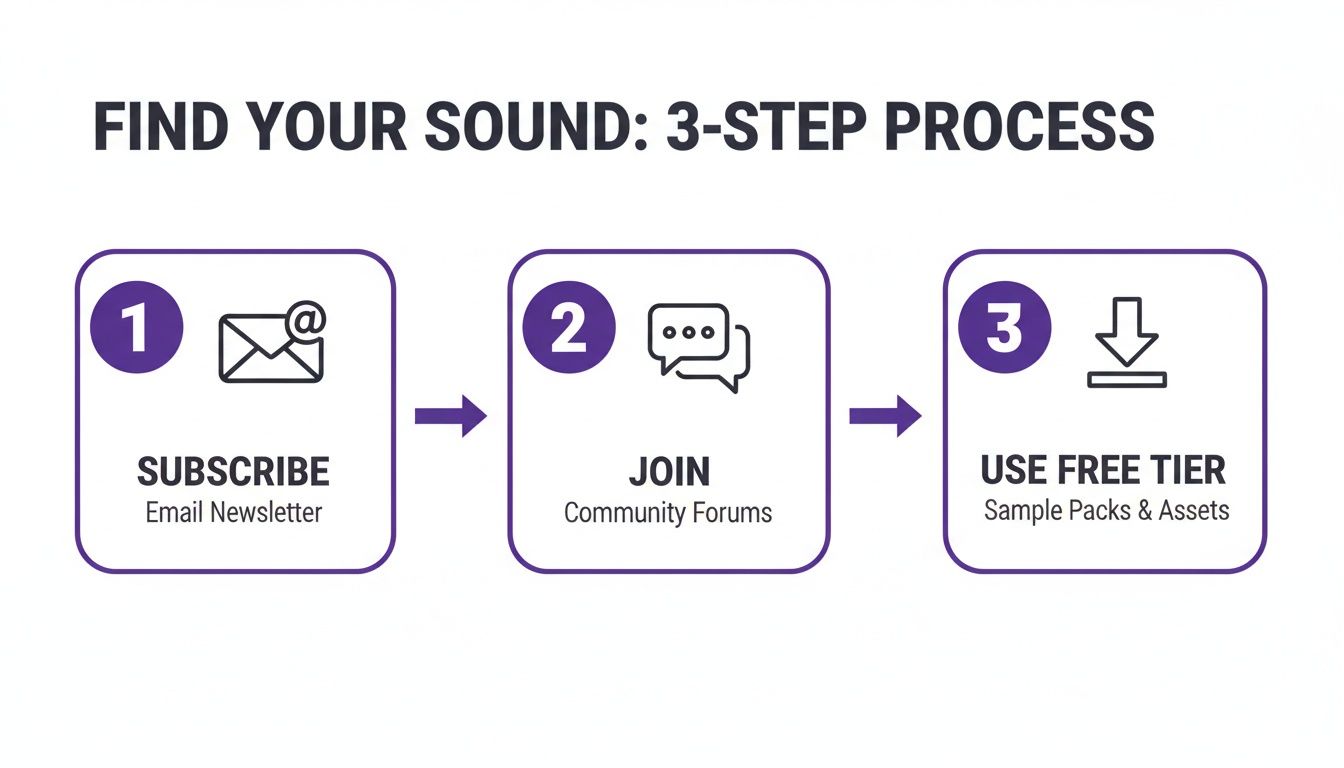
This is how producers build massive, high-quality libraries without spending a dime—they tap directly into the community and industry channels.
Adding Your Folders to the FL Studio Browser
First, you need to tell FL Studio where your new sounds live. This is a quick, one-time setup for each new main sample folder you create, and it’s the most important thing you can do for a fast workflow.
Here’s how it’s done:
- Open up FL Studio and head to the top menu. Click Options > File Settings.
- Look for a section labeled “Browser extra search folders.” This is where we’ll work.
- Click an empty folder icon on the left, which will open your computer’s file explorer.
- Navigate to the folder where you saved your new sound pack and select it.
Once you’ve selected it, the path to that folder will appear in the list. That’s it! FL Studio now knows where to look. Just close the settings window and you’re almost there.
The most common mistake beginners make is just dragging single audio files into a project. By adding the entire folder to the browser, you make your whole sound library instantly searchable and accessible for all future projects. It’s a total game-changer.
The Essential Refresh Trick
After adding your folder in the File Settings, it won’t just appear in the Browser on its own. You need to give it a little nudge.
In the Browser panel (usually on the left side of your screen), click the small drop-down arrow at the very top and select “Refresh.” You can also just hit the R key on your keyboard as a shortcut.
Instantly, your new folder will pop into the list, neatly organized and ready for you to drag sounds right into your project.
Beyond FL Studio: A Universal Asset
One of the best things about collecting sound packs is that they aren’t locked to one piece of software. Nearly every pack you download will contain .WAV files, which is the industry-standard format for high-quality, uncompressed audio.
This means those killer 808s and crisp hi-hats you just installed can be used in other DAWs like Ableton Live, Logic Pro X, or Cubase. Your sound library becomes a versatile asset that grows with you, no matter what software you end up using.
This is more relevant than ever, as FL Studio has become a true industry powerhouse. It’s one of the most visible DAWs on platforms like YouTube and TikTok, making it a gateway for countless new producers. If you’re curious, you can learn more about the DAW market landscape to see just how central these tools have become.
Once you master this simple installation process, you’re ready to start cooking up some incredible tracks. For more creative guidance, check out our in-depth article on how to use samples in FL Studio to turn those new sounds into finished beats.
Verifying Licenses to Keep Your Music Safe
This is the part everyone wants to skip. I get it. Finding a killer FL Studio sound pack free of charge feels like a win, and the last thing you want to do is read the fine print. But trust me on this—this is a mistake that can seriously derail your career.
It might not be the most exciting part of making music, but understanding licensing is non-negotiable if you’re serious.
What Does “Royalty-Free” Actually Mean?
Let’s clear this up, because it’s a term that gets thrown around a lot. Royalty-free simply means you can use the sounds in your commercial projects without paying ongoing fees (royalties) to the person who made them.
Think of it this way: you can drop those sounds into a beat you sell to an artist or a track you upload to Spotify, and you won’t owe the sound designer a cut of your earnings down the line. It’s your legal green light to create and monetize.
Without that permission, you’re building your music on a foundation of sand. Imagine a track you produced suddenly lands a placement in a big Netflix show. If those drum loops weren’t cleared for commercial use, you’re looking at potential legal action, losing your payout, and taking a massive hit to your reputation. It’s just not worth the risk.
Your 60-Second Licensing Checklist
Make this a habit. For every single pack you download, run through this quick check. It takes less than a minute and will save you from major headaches later.
- Look for a
license.txtfile. The very first place to check inside the unzipped folder is for a file namedlicense.txt,readme.txt, or something similar. Any reputable creator will include one that clearly spells out what you can and can’t do. - Check the download page. If there’s no text file, head back to the website where you got the pack. Look for a “Terms of Service,” “FAQ,” or “License Info” link. The rules should be there.
- Spot the obvious red flags. This one is huge. Be very suspicious of packs that contain obvious, uncleared samples from famous songs. If you download a “vintage soul kit” and find a perfectly chopped loop from an old Michael Jackson track, run. It’s a dead giveaway the creator didn’t have the rights to distribute it in the first place.
A legitimate royalty-free license is your proof of ownership for the music you create with those sounds. It’s the piece of paper that lets you confidently sell your beats and sign contracts without worrying about legal trouble biting you back.
Think of it as your producer’s insurance policy. Let’s say a YouTuber with a million subscribers wants to license your beat for their intro music. The first thing their business manager will ask is for confirmation that all the elements are cleared. Having a folder with all your sound packs and their corresponding license files turns that into an easy, professional conversation.
Taking thirty seconds to verify a license today protects the value of the music you’ll work on for years to come.
Organizing Your Sound Library for a Faster Workflow
Let’s be real: a messy sample library is a total creativity killer. Nothing breaks your focus faster than digging through a chaotic “Downloads” folder looking for the right sound. We’re going to move past just dumping files into FL Studio and build a professional-level organization system that will completely change how you make music.
The goal is simple: turn your growing collection of sounds into a lightning-fast creative arsenal.
Imagine finding the perfect 808, hi-hat, and snare for a trap beat in under ten seconds. That’s not a fantasy—it’s what happens when you have a system. The very first step is getting your samples off your main system drive, especially if you’re on a laptop with limited space.
Building Your Master Sample Folder
The system top producers use is surprisingly straightforward. They create one master “Samples” folder, usually on a dedicated external drive (an SSD is best for speed). This simple move prevents your main drive from getting clogged up and slowing down FL Studio. Inside that master folder is where the real magic happens: a clean, predictable structure.
A smart naming convention is the key to making this work. Forget generic folder names like “Trap Kit 2.” Instead, use a descriptive format that tells you everything at a glance.
- DRUMS_TRAP_PACKNAME
- MELODIES_LOFI_PACKNAME
- VOCALS_RNB_PACKNAME
This structured approach makes your library instantly searchable and scalable. Every time you download a new FL Studio sound pack free of charge, you just unzip it and drop it into the right category. Simple.
There’s a massive demand for these kinds of resources. The audio software plugin market, which goes hand-in-hand with sound packs, is projected to hit USD 2.59 billion by 2035, with music production accounting for a staggering 61% of all plugin use. This just shows how vital quality, accessible sounds are to modern producers. You can read more about the growth of audio production tools and see why a killer library is a producer’s biggest asset.
Using FL Studio’s Tools for Visual Speed
Once your folders are set up on your external drive, it’s time to pull them into FL Studio’s Browser. This is where you can take your organization to the next level and make your workflow even faster.
The less time you spend searching for sounds, the more time you spend in a creative flow state. Your sample library should feel like an extension of your brain, not a cluttered closet you’re afraid to open.
FL Studio has a brilliant little feature that lets you color-code folders in your Browser for instant visual recognition. Just right-click any folder you’ve added and select “Color.” It seems small, but it’s incredibly powerful.
- Red for Drums: Instantly spot all your drum kits.
- Blue for Melodies: Quickly find your melodic loops and one-shots.
- Green for Vocals: Isolate vocal chops and acapellas with a single glance.
- Yellow for FX: Jump straight to your risers, impacts, and transitions.
Combining a clean external folder structure with internal color-coding transforms your sound library from a random pile of files into a high-speed, intuitive instrument. You’ll make better beats, faster. It’s as simple as that.
Got Questions About Free FL Studio Packs? Let’s Dig In.
Every producer has questions when they start diving into the world of free sounds. Getting straight answers means you can download with confidence and just focus on making music. Let’s tackle some of the most common ones I hear.
Are “Royalty-Free” Packs Actually Free for Commercial Use?
Yes, for the most part, they absolutely are. When a pack is labeled “royalty-free,” it means you get to use those sounds in your commercial tracks on Spotify, YouTube, or anywhere else without paying the creator a cut of your earnings. You get a one-time license—which, in this case, costs you nothing—and that’s it.
But here’s a pro tip: always take 30 seconds to check the license. Most legitimate packs will include a license.txt file or have the terms clearly spelled out on the download page. Sometimes there are small restrictions, like you can’t resell their sounds as part of your own sample pack. It’s a quick check that can save you a massive headache down the line.
Can I Use These Packs in Ableton, Logic, or Other DAWs?
Definitely. The beauty of most sound packs is that they’re delivered in the universal .WAV audio format. This isn’t some proprietary FL Studio file; it’s the uncompressed, high-quality standard for the entire music industry.
That means you can load these same kicks, snares, and melodies into Ableton Live, Logic Pro X, Cubase, or Studio One without a single issue. While this guide walks you through the FL Studio process, the core idea of adding a folder to your software’s browser is pretty much the same everywhere.
Think of your sound library as a separate asset from your DAW. Every pack you collect builds a versatile, software-agnostic toolkit that will serve you throughout your entire production career, regardless of the software you use.
What’s the Real Difference Between a Sample Pack and a Loop Kit?
The terms get thrown around a lot, and it can be confusing. Knowing what you’re looking for helps you grab the right tool for the job.
Here’s the simple breakdown:
- Sample Pack / Drum Kit: This is your collection of “one-shots”—single sounds like a kick, a snare hit, a hi-hat, or a synth stab. These are the raw ingredients you use to build your own drum patterns and melodies from the ground up.
- Loop Kit: This gives you pre-made musical ideas. Think four-bar drum patterns, chord progressions, or a catchy melody loop. They’re fantastic for sparking an idea fast or for layering on top of something you’ve already started.
- Construction Kit: This is the whole shebang. It gives you the individual instrument tracks (or “stems”) from a complete song idea. You’ll get separate files for the drums, bass, synths, and everything else. It’s an incredible way to see how a professional track is arranged or to quickly build a full beat.
Help! My New Sound Pack Isn’t Showing Up in FL Studio.
Don’t worry, this happens to everyone. It’s almost always a simple fix. If you’ve dragged your folder into FL Studio but can’t find your sounds in the browser, it just means the program hasn’t scanned for them yet.
First, just double-check your work. Head over to Options > File Settings and make sure the path to your new folder is listed correctly under the “Browser extra search folders” section.
If the folder is there, you just need to give FL Studio a little nudge. At the top left of the Browser panel, click the small drop-down arrow and hit “Refresh.” Even faster, just click inside the browser and press the R key on your keyboard. Your new sounds should pop up instantly, ready to go.
Ready to stop searching and start creating? FL Studio Sound Packs offers a massive, royalty-free library of exclusive sample packs, loops, MIDI files, and construction kits for one single price. Get instant access to every sound you need to make professional-quality beats today. https://www.flstudiosoundpacks.com