
Royalty Free Sample Packs a Guide for Modern Producers
Put simply, royalty-free sample packs are curated bundles of audio files—things like crisp drum hits, catchy melodic loops, or slick vocal chops—that you can legally use in your own music. Once you buy a pack, you can drop those sounds into your commercial tracks on Spotify or YouTube without ever having to pay ongoing fees or royalties to the original creator.
What Exactly Are Royalty-Free Sample Packs?
Imagine having a pro session player on speed dial, ready to lay down the perfect guitar riff or a hard-hitting drum groove whenever inspiration strikes. That’s the real power of royalty-free sample packs. They’re toolkits packed with production-ready sounds, built to save you time and kickstart your creativity.
Think of it like buying a set of high-end paintbrushes. Once you own them, you’re free to create and sell as many paintings as you want without paying the brush maker another dime. That’s how royalty-free sounds work. The one-time purchase grants you a license to use them in your own commercial art.
The Building Blocks of Modern Music
For producers in any genre, these packs are the foundational elements of modern music creation. They give you immediate access to top-tier audio that would otherwise demand expensive studio time, session musicians, and a ton of recording gear to capture from scratch.
For many producers, digging through a deep library of diverse sample packs is the very first step to building a professional-sounding track.
A great sample pack isn’t just a folder of sounds; it’s a launchpad for inspiration. It gives you polished, professional elements that help you break through creative blocks and start building a track immediately.
What Do You Get in a Typical Pack?
While the contents can vary, most packs contain a mix of audio types designed to work together. This gives you the flexibility to build a beat from the ground up or just find that one missing piece to complete your vision.
Here’s what you’ll usually find inside:
- One-Shots: These are single, individual sounds—a kick drum, a snare, a cymbal, or a synth stab. They are absolutely essential for programming your own custom drum patterns and melodies in the Channel Rack.
- Loops: These are short, repeating audio phrases, like a four-bar drum beat or a slick guitar riff. Loops are perfect for quickly getting a groove going or adding a foundational layer to your track.
- MIDI Files: Instead of audio, MIDI files contain musical data—the notes, their velocity, and timing. You can drag this data onto any of your virtual instruments, giving you total control to change the sound, the key, or the melody itself. It’s pure creative freedom.
- Construction Kits: These are goldmines for learning. A construction kit gives you all the individual instrument tracks (also called “stems”) from a fully produced demo song. They’re amazing for seeing exactly how a professional track is layered and mixed.
How Music Licensing Protects Your Productions
Trying to figure out music licensing can feel like fumbling around in the dark. If you get it wrong, you’re setting yourself up for major headaches—takedown notices from Spotify, copyright strikes on YouTube, or even legal battles that could stop your career in its tracks.
Getting the licensing right isn’t just a technicality; it’s the single most important step you can take to protect the music you pour your heart into.
To make it simple, think of it like a traffic light for the sounds you use in your beats. This little analogy will help you instantly spot what’s safe to use and what’s going to get you in trouble. It’s all about knowing when to stop, when to be careful, and when you can hit the gas.
The Traffic Light System for Music Licensing
For any producer serious about releasing music commercially, understanding your rights is non-negotiable. This system clears the path.
- Green Light: Standard Royalty-Free Licenses This is where you want to be. When you buy one of our royalty-free sample packs, you’re getting a Green Light license. It means you can use the sounds in your commercial tracks on Spotify, Apple Music, and YouTube without a single restriction or future payment. It’s your creative freedom, locked in and legally secure.
- Yellow Light: Licenses with Restrictions Here, you need to proceed with caution. Some free packs or sounds from sketchy sources come with strings attached. They might demand you credit the original creator (attribution) or flat-out ban you from using the sounds in any project you plan to sell. Always, always read the fine print before dragging these into your DAW.
- Red Light: Not Cleared for Use Stop. Immediately. This is the danger zone. It includes ripping sounds from hit songs, movies, or video games without getting permission. Using these uncleared samples is straight-up copyright infringement, and it puts your entire track at risk. Trust me, it’s never worth it.
The term ‘royalty-free’ doesn’t mean ‘copyright-free.’ The original creator still owns the copyright to the sound itself; they are simply granting you a license to use that sound in your own original musical works without paying them future royalties.
Royalty-Free vs. Copyright-Free
This is a critical difference that trips up a ton of producers, so let’s clear it up.
Royalty-free means you pay a one-time fee to get the license. After that, you’re free to use the sound in your commercial music without ever paying another dime in royalties. The sound designer still owns the original sound file, but you’ve legally secured your right to use it.
Copyright-free (often called Public Domain) means the sound has no owner. Anyone can use it for absolutely anything without asking permission or paying. Sounds like this are incredibly rare and usually don’t have the punch or quality of professionally made samples.
For any producer making music to be sold or streamed, royalty-free is the professional standard. It guarantees you’re working with high-quality, legally safe sounds while respecting the artists who created them.
Common Pitfalls and How to Avoid Them
Even with good intentions, it’s easy to slip up. One of the biggest mistakes is downloading “free” packs from random forums or shady YouTube descriptions. More often than not, these sounds have zero licensing info, leaving you completely exposed.
Another common trap is misreading the license terms. If a license says “non-commercial,” that means you cannot use the sound in a song you plan to sell, stream, or monetize in any way. Unless you have a clear, written license that says you can use a sound commercially, you have to assume you can’t.
Your safest bet is to build your sample library from sources you trust. It’s also smart to keep a record of your purchases and their license agreements—think of it like a folder of receipts for your creative tools. Having that paper trail is your best defense if anyone ever questions your rights.
You can see exactly how we protect your music by checking out the simple, straightforward licensing terms on our Terms and Conditions page.
Choosing the Right Sounds for Your Beat Making Arsenal
Picking the right sounds is the very first step toward making a track that actually stands out. Think of your sample library as your personal creative toolkit—building it with purpose is what separates a frustrating, dead-end session from one where the ideas just flow. With so many royalty free sample packs out there, knowing what to look for is key to investing in sounds that actually match your vision.
The market for these sounds has exploded, which just goes to show how vital they’ve become for modern producers. The creator sample pack marketplace, once valued at $1.27 billion, recently jumped to $1.48 billion thanks to a massive 16.7% annual growth rate. Experts predict it’ll keep climbing, hitting a projected $2.71 billion by 2029. This isn’t just a trend; it’s a clear sign that producers need a steady supply of high-quality, ready-to-use sounds. If you’re curious about this growth, you can dig deeper into the numbers with the full market analysis from Gii Research.
Start with Your Genre
Before you even think about hitting that “buy” button, the most important filter is your genre. The ingredients for a hard-hitting Trap banger are completely different from what you’d need for a chill Lofi beat. If you start by aligning your search with your genre, you’ll save yourself from drowning in sounds you’ll never use.
- For Trap Producers: You absolutely need a foundation of thunderous 808s, razor-sharp hi-hats for complex rolls, and snares that punch right through the mix. Melodically, you’ll be looking for dark synth pads, spooky bells, and moody piano loops.
- For Lofi Hip Hop Producers: Your go-to packs should be filled with dusty drum breaks, mellow Rhodes keys, and warm, vinyl-crackled textures. The goal is to find sounds that feel organic, a little imperfect, and soaked in nostalgia.
- For House Producers: The essentials here are punchy four-on-the-floor kicks, groovy basslines, classic synth stabs, and maybe some soulful vocal chops. Everything should feel clean, precise, and built for the dancefloor.
Thinking genre-first is the best way to avoid building a massive, cluttered library of sounds that just collect digital dust.
Understanding the Different Content Types
Beyond genre, you need to understand the type of content in a pack. This dictates how you’ll actually use the sounds in your workflow. Each format serves a different creative purpose, whether you need instant inspiration or total control. Knowing the difference helps you grab packs that fit your production style, whether you’re a build-from-scratch kind of producer or someone who likes to find a spark and run with it.
A well-rounded sound library isn’t just about quantity; it’s about having the right tool for the job. Loops provide instant vibe, one-shots offer precision, and MIDI delivers ultimate control over your melodies and harmonies.
The table below breaks down the four main types of content you’ll run into. Getting a handle on their strengths and weaknesses is the secret to building a versatile library that’s ready for any idea you throw at it.
Comparing Sample Pack Content Types
| Content Type | Description | Best For | Creative Control |
|---|---|---|---|
| One-Shots | Single drum hits or synth stabs (e.g., a kick, snare, C note). | Building custom drum patterns from scratch and programming unique melodies. | High |
| Loops | Short, pre-recorded audio phrases (e.g., a 4-bar drum beat or guitar riff). | Quickly starting a track, finding inspiration, and adding layers. | Low |
| MIDI Files | Musical data (notes, velocity) that can be applied to any instrument. | Customizing melodies, changing sounds, and learning music theory. | Very High |
| Construction Kits | A folder containing all the individual stems of a demo track. | Deconstructing professional tracks and learning arrangement techniques. | Moderate |
So, what does this mean in practice? A MIDI file gives you the blueprint for a killer melody, but you can assign it to your favorite synth in FL Studio, change the key, and tweak every single note to your heart’s content. A WAV loop, on the other hand, is a finished audio clip—perfect for chopping up or dropping right into your project for immediate impact. By grabbing packs with a healthy mix of these elements, you’re setting yourself up for success no matter where your creativity takes you.
Integrating Sample Packs into Your FL Studio Workflow
Turning a folder full of amazing sounds into a finished track is all about your workflow. For those of us using FL Studio, bringing royalty free sample packs into a project should feel completely natural, almost like an extension of your own musical ideas. The whole point is to get your sounds so organized and accessible that grabbing the perfect kick or loop is instant.
First things first: you absolutely have to tell FL Studio where your sounds are. A messy, disorganized sample library is the fastest way to kill a vibe. Trust me, spending a few minutes on setup now will save you countless hours of frustrating folder-diving later on.
This little guide breaks down the simple but crucial steps of sound selection. It’s about making sure you’re grabbing the right ingredients for your track right from the jump.
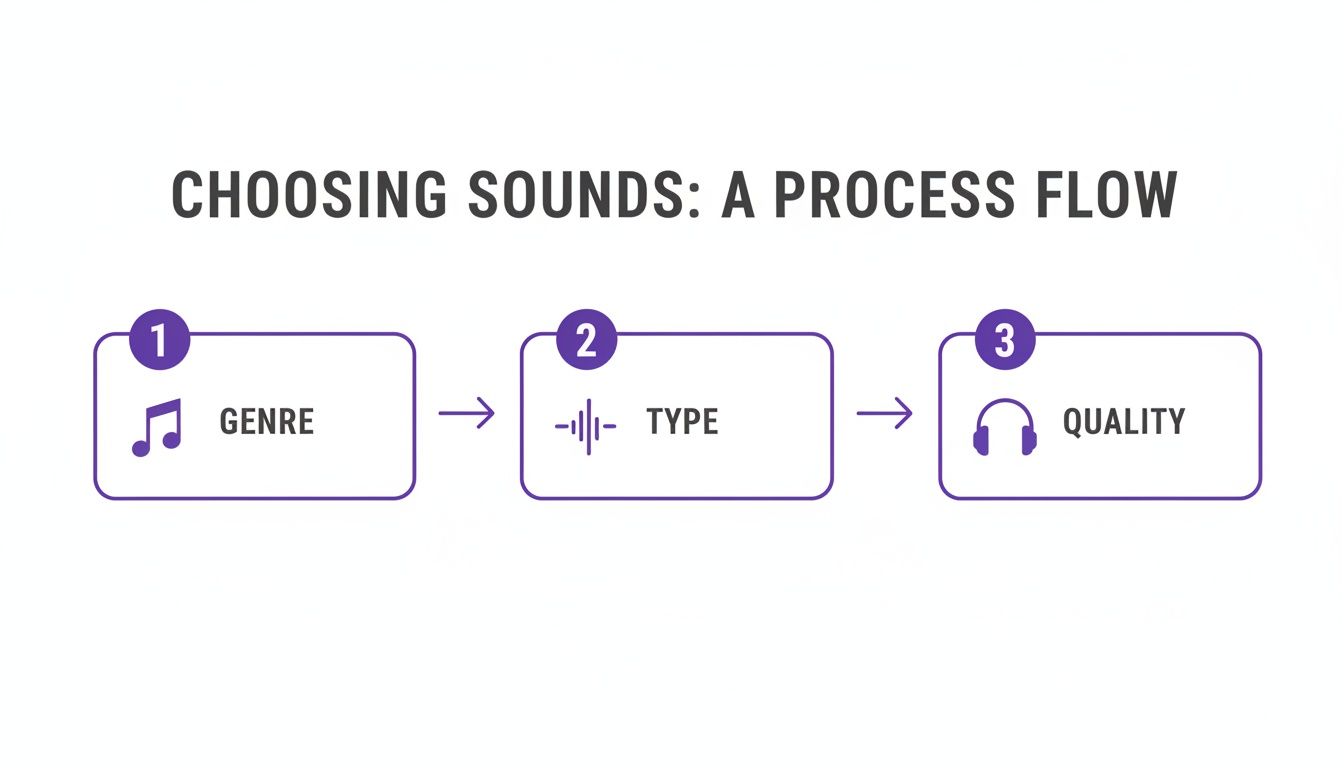
Moving from genre to sound type to a quick quality check is a simple but really effective way to keep your production focused and moving forward.
Adding Your Library to the FL Studio Browser
The secret to a lightning-fast workflow is getting all your sounds into the FL Studio Browser panel. That’s the section on the left side of your screen. When it’s set up right, your entire library is just a drag-and-drop away from becoming part of your next banger.
Here’s the quick and easy way to set it up:
- Open FL Studio and head to Options > File Settings.
- Look for the “Browser extra search folders” section and click on an empty folder icon.
- Find the main folder where you keep all your sample packs and select it.
- That’s it! Close the settings window. Your sound library will pop up in the Browser, ready for action.
Once you do this, you can browse, preview, and pull any sample straight into your project without ever having to minimize the DAW. It’s a simple step, but it completely changes your collection from a static folder into a living, breathing part of your creative space.
Core Techniques for Using Samples in FL Studio
With your library locked and loaded, it’s time to actually make some music. Different types of samples work best in different parts of FL Studio. Knowing where to drag each sound is key to building tracks efficiently.
Building Drum Patterns with One-Shots The Channel Rack is the heart and soul of beat making in FL Studio. This is where you’ll drag your individual drum one-shots—kicks, snares, hats, claps—to build your rhythms from the ground up.
Just find a kick you like in the Browser, drag it onto a new channel, and start clicking in your pattern. Do the same for your snare, hats, and percussion, and you’ll have a unique groove that’s 100% yours. For a deeper dive, our guide on making beats with FL Studio really gets into the weeds of pattern creation.
The real magic of one-shots is how flexible they are. Once a sample is in the Channel Rack, you can tweak its volume, panning, pitch, and envelope right in the Channel Settings window. This gives you surgical control over your drum mix.
Working with Loops in the Playlist Melodic loops and drum loops are cheat codes for instantly setting a vibe. The Playlist is where you’ll arrange these audio clips to build out the structure of your song. Just grab a loop from the Browser and drop it directly onto an audio track in the Playlist.
Most of the time, FL Studio is smart enough to automatically time-stretch the loop to match your project’s tempo. If it doesn’t get it right, fixing it is easy. Just select the clip, go to its top-left menu, and choose Fit to tempo > Type in (BPM) to lock it perfectly to the grid.
Advanced Sample Manipulation
Going beyond a simple drag-and-drop is where you start to develop your signature sound. FL Studio has some seriously powerful built-in tools for chopping, reversing, and completely transforming audio.
Here are a few techniques you should definitely try:
- Chopping Loops in SliceX: Drag a loop from the Browser straight into the SliceX plugin on your Channel Rack. SliceX will automatically chop the loop into individual hits at every transient. You can then play these slices on your MIDI keyboard to create entirely new patterns and rhythms.
- Reversing Samples for Texture: Double-click any audio clip in your Playlist to open its settings. Just tick the “Reverse” box to instantly flip the audio. This is a classic trick for creating atmospheric build-ups, cool transitions, and unique sound effects.
- Shaping with the Sampler Envelope: For any sound you’ve loaded into the Channel Rack, click on it to open the Channel Settings. Find the ADSR (Attack, Decay, Sustain, Release) envelope and use it to shape the sound’s volume over time. Try shortening the decay on a kick to make it punchier or giving a pad a longer attack to make it swell in slowly.
Why Investing in a Quality Sound Library Is a Smart Move
As a producer, what are your two most valuable assets? It’s not your gear—it’s your time and your creativity. A high-quality sound library isn’t just another folder of files; it’s a strategic investment in both of those things. It’s the difference between wasting an hour hunting for a usable kick drum and immediately finding one that sparks an entire track.
This is about way more than just convenience. It’s about building a creative ecosystem you can actually rely on. When you have an arsenal of professional, release-ready sounds at your fingertips, you get rid of all the friction that kills your workflow. That means less time hunting, more time creating.
Speed Up Your Workflow
Think about all the time you’ve sunk into scrolling through sketchy websites, downloading “free” packs only to find they’re poorly recorded, mislabeled, or even worse—not cleared for commercial use. It’s a frustrating cycle that completely kills your momentum and yanks you out of the creative zone.
Investing in a curated library from a trusted source like FL Studio Sound Packs flips that script. Everything is organized, top-notch quality, and 100% legally safe. The result is a seamless workflow where you can audition and drop sounds into your project in seconds, keeping that creative spark alive.
The demand for these tools is massive for a reason. Splice, a huge player in the game, reported its community had downloaded over 2 billion samples and sound packs. That staggering number shows just how much producers rely on quality libraries to get work done. For a deeper dive, you can check out a full analysis of the creator sample pack market.
A well-curated sound library is your creative safety net. It ensures that every idea you have can be explored instantly with professional-grade sounds, turning inspiration into a finished track faster than ever before.
Get That Professional, Polished Sound
The sonic quality of your tracks is your calling card. You can have the most brilliant composition, but if you’re using low-quality or badly mixed samples, the whole production will sound amateur. Professional sound designers spend years honing their craft to create samples that are truly plug-and-play.
- Mixed and Mastered: Sounds are already processed with the perfect amount of punch, clarity, and stereo width, ready to sit perfectly in your mix.
- Sonically Cohesive: Packs are often designed so that the sounds inside naturally fit together, making it way easier to build a balanced, pro-sounding track.
- Release-Ready: These sounds meet the technical standards for commercial platforms like Spotify and Apple Music, ensuring your music sounds great everywhere it’s heard.
This is the kind of quality control you almost never find in those random free downloads. By investing in premium royalty-free sample packs, you’re basically embedding professional audio engineering directly into your projects from the jump.
Your Ultimate Creative and Legal Insurance
Finally, a quality sound library gives you something priceless: peace of mind. Every producer’s worst nightmare is getting a takedown notice or a lawsuit because of an uncleared sample. That endless hunt for free sounds online is a minefield of potential copyright headaches.
When you buy sounds from a reputable provider, you’re not just buying audio files. You’re buying a license that guarantees your right to use those sounds commercially, forever. This legal protection is invaluable, making sure every track you release is built on a solid, safe foundation. It’s an investment in your career that protects your music and your reputation for years to come.
Common Questions About Royalty-Free Samples
Diving into the world of royalty-free sample packs always brings up a few key questions. As you start building your sound library and making music you plan to release, you need straight answers. Let’s clear up the confusion so you can get back to what really matters—making beats.
Can I Use Royalty-Free Samples in Songs I Post on Spotify?
Yes, you absolutely can. In fact, that’s the whole point of a royalty-free license.
When you grab a sample pack from a good source, the license gives you the green light to use those sounds in your own music. You can then upload those tracks to Spotify, Apple Music, TIDAL, and anywhere else without worrying about copyright strikes or paying the sound’s creator another dime.
The only thing to check is that the pack comes with a clear commercial use license. That’s your ticket to a worry-free release.
What’s the Difference Between a MIDI Pack and a WAV Loop Pack?
This one’s a big deal, and it all comes down to control versus convenience.
A WAV loop pack is full of pre-recorded audio files. You can definitely chop them up, stretch them, reverse them, or drench them in effects, but you can’t change the actual notes in a melody or chord progression. It’s like a snapshot of a finished performance.
A MIDI pack, on the other hand, is pure data—not audio. It’s like a digital blueprint that tells your software which notes to play, how hard, and for how long. You can drag that MIDI file onto any virtual instrument in FL Studio and completely change the sound, switch up the notes, or adjust the tempo and rhythm. It gives you way more freedom to make it your own.
Think of a WAV loop as a photograph—you can crop it or apply a filter, but you can’t change what’s in the picture. MIDI is like the 3D model—you can change the lighting, the angle, the materials, and every other detail to build something brand new.
Do I Have to Credit the Creator of the Sample Pack?
For almost all commercial royalty-free sample packs, the answer is no. You don’t need to give any credit or attribution. The license you buy is designed to let you use the sounds as if they were your own raw material for a brand-new song.
That said, it’s always a good habit to take a quick 30-second scan of the license agreement that comes with any pack you download. It’s super rare for professional packs to require credit, but some freebies or niche libraries might. A quick check gives you total peace of mind.
Are Construction Kits a Good Way for Beginners to Learn?
Yes, they are an amazing learning tool, especially when you’re just starting out. A construction kit gives you all the individual instrument tracks—often called “stems”—from a finished demo song.
You can drag these stems right into your FL Studio playlist and see exactly how a professional track is put together. It’s a behind-the-scenes look at how the drums, bass, melodies, and effects all work together. Honestly, it’s one of the fastest ways to learn about layering, mixing, and song structure.
Ready to build a professional, legally-safe sound library? FL Studio Sound Packs offers instant access to a massive catalog of high-quality, royalty-free sounds designed to elevate your productions. Explore our entire collection today at https://www.flstudiosoundpacks.com.