
Finding the Best Free Drum Samples for Your Beats
So, what separates the truly best free drum samples from the digital junk clogging up your hard drive? It really boils down to three things: crisp WAV audio quality, a bulletproof 100% royalty-free license, and sounds that actually fit the music you’re trying to make.
Nail these three, and you’ve got professional-grade tools, not just another folder of random noises.
What Makes a Free Drum Sample Genuinely Good
Let’s cut right to it. Finding the “best” free drums isn’t about one magic download—it’s about finding the right ingredients for your sound.
Think of it like a chef picking out produce. The right ingredients totally depend on the dish you’re making. That gritty, blown-out 808 that sounds perfect in a trap banger? It’s going to stick out like a sore thumb in a clean, punchy house track.
Real quality is a mix of technical perfection and creative fit. The whole point is to build a sound library that works for you, so you can spend your time making music instead of endlessly auditioning kicks.
The Three Pillars of Quality
Before you download any free pack, you need to check for three key things. Getting this right from the start saves you a world of pain later on, whether it’s dealing with a muddy mix or getting a copyright strike on a track you just released.
- Audio Fidelity: This is all about the technical quality of the file itself. You should always be looking for packs that give you samples in .WAV format. Unlike MP3s, WAV files are lossless, meaning they hold all the original, uncompressed audio information. This is a huge deal for producers because it lets you mangle the sound—EQ, compression, saturation—without it falling apart into a mess of digital artifacts.
- Genre Authenticity: The sample has to make sense in the world you’re building. A kick for a hard-hitting EDM track needs that sharp, punchy transient and a super clean low-end. On the other hand, a classic hip-hop snare might need that perfect lo-fi crunch and snappy decay. The best free packs are usually put together with a specific genre in mind.
- Licensing Clarity: Honestly, this is the most important and most overlooked part. Just because a download is “free” doesn’t mean it’s “free to use in your next hit song.” The gold standard here is a 100% royalty-free license. This is your green light to use the sample in music you sell or put on Spotify and Apple Music without ever owing anyone a dime.
We’re in a golden age for digital production, and high-quality samples are more available than ever. The global drum kit market was valued at $1.04 billion in 2026 and is expected to hit $1.8 billion by 2035. This boom shows a massive shift, with sample packs and software now displacing 25% of what used to be entry-level physical drum kit sales. Producers want instant, pro-level sounds, and the market is responding. You can dig into more of these drum kit market trends from Business Research Insights.
When you’re evaluating a new pack, it pays to have a clear checklist. Think of it as your quality control process before adding anything to your personal library.
Key Criteria for Evaluating Free Drum Samples
This table breaks down the essential factors that determine the quality and usability of a free drum sample pack.
| Quality Factor | What to Look For | Why It Matters for Your Beats |
|---|---|---|
| File Format | .WAV files (24-bit/44.1kHz or higher) | Lossless quality means you can heavily process the sound (EQ, compress, saturate) without it degrading. Essential for a clean, professional mix. |
| Sound Design | Clean transients, full frequency range, no clipping | A well-designed sample sits better in the mix from the start, requiring less fixing and giving your drums more punch and clarity. |
| Genre-Specificity | Sounds labeled for your genre (e.g., “Trap 808s”) | This ensures the sonic character—the punch, decay, and texture—is already in the ballpark for your track, speeding up your workflow. |
| Licensing | A clear “100% Royalty-Free” statement | This is your legal protection. It guarantees you can use the sounds in commercial releases without fearing copyright claims or owing future fees. |
| Organization | Clearly named files and folders (e.g., Kicks, Snares) | A well-organized pack saves you from endless searching. You can find the sound you need in seconds and stay in the creative flow. |
Having these criteria in mind turns you from a sample hoarder into a sample curator, building a library that truly serves your music.
Spotting Pro-Level Samples
Once you’ve downloaded a new pack, do a quick quality check. Drag a few samples into your DAW and just look at the waveform. Is it clean? Or are the peaks squared off and clipped?
Then, listen. Use good headphones or your studio monitors. Do the kicks have a solid, defined low end, or are they flabby and muddy? Are the hi-hats crisp and bright, or do they sound dull and cheap? The best free drum samples should sound polished and ready to go right out of the box.
Sourcing and Downloading Drum Packs Safely
Finding killer sounds is one thing; getting them onto your computer without wrecking your projects or your machine is the real challenge. The internet is overflowing with amazing freebies, but it’s also a minefield of sketchy downloads and legal gray areas. Learning to spot the difference is a non-negotiable skill for any producer today.
Think of it like exploring a new city. Some neighborhoods are well-lit, reputable, and safe to wander through, while others you’re better off avoiding entirely. Your goal is to stick to the trusted districts where the best free drum samples live, so you can build your library without looking over your shoulder.
Identifying Trusted Sample Sources
The safest places to find professional-grade free drum samples are almost always straight from the creators. This means established sound design labels, reputable music production blogs, and communities run by artists you actually trust. These sources have a reputation to protect and a real interest in giving you quality stuff.
On the flip side, you have sketchy aggregator sites that just scrape content from all over the web. These are a huge red flag. They often bundle legit freebies with unlicensed or, even worse, malicious files. And torrent sites? Just stay away. They’re a hotbed of copyright infringement and malware, putting both your computer and your career at risk.
Here’s what a trustworthy source usually looks like:
- Established Sound Labels: Big names like Black Octopus Sound or Samples From Mars often give out free taster packs to show you what their premium products are all about. You know they’re professionally made and properly licensed.
- Artist-Run Communities: A lot of producers will drop free drum kits for their followers on Discord or their own websites. It’s their way of building a community and giving back.
- Reputable Blogs and Resource Sites: Music production blogs that have been around for a while often curate lists of the best free resources or even cook up their own exclusive packs.
A Practical Safety Checklist for Every Download
Before you even think about clicking that download button, run through a quick mental checklist. This simple habit can save you from massive headaches later, from viruses to copyright claims that get your music yanked from streaming platforms.
The real danger isn’t just a virus slowing down your PC. An unverified download can contain uncleared samples, leading to a copyright strike on your YouTube or Spotify release. Protecting your computer is important, but protecting your music career is essential.
When checking out a new source, look for these clear signs of legitimacy:
- Clear Licensing Information: The site should spell it out for you: the samples are 100% royalty-free for commercial use. If the license terms are vague or missing, that’s a huge warning sign.
- Professional Website Design: A clean, well-organized site shows the creators are serious. If you’re dodging pop-up ads or dealing with broken links and a cluttered layout, it’s probably not a place you want to download from.
- Authentic User Feedback: See what other producers are saying. Look for genuine reviews or comments on forums like Reddit or in community groups to gauge the quality and legitimacy of the packs.
- Direct and Secure Download: The download link should take you right to a file (usually a .zip) from the site’s own server or a trusted service like Dropbox or Google Drive. If you’re being bounced through multiple ad-filled pages, back out.
By sticking to this simple framework, you can explore the world of free sounds with confidence. For a deeper dive into organizing what you find, check out our detailed guide on managing your free sound packs to build a library that works for you. Building a collection of the best free drum samples is a marathon, not a sprint, and doing it safely ensures all your hard work pays off.
Understanding Sample Licenses to Protect Your Music
Hunting for free drum samples can feel like a gold rush, but ignoring the fine print is a producer’s biggest mistake. I know licensing sounds intimidating—it’s often packed with legal jargon that makes your eyes glaze over. But trust me, getting a handle on it is the single most important thing you can do to protect your music and your career.
Think of a sample’s license like the deed to a piece of land. It tells you exactly what you can build on it, if you can sell the final product, and whether you owe the original owner a cut. Getting this wrong is a fast track to copyright claims that can yank your music from Spotify and YouTube, or even land you in legal hot water.
The Gold Standard: Royalty-Free
The most important term you’ll ever see is royalty-free. This is what you should always be looking for when you download free drum samples. It’s the green light for any serious producer.
A royalty-free license is like buying a high-quality hammer. Once you’ve paid for the hammer (or in our case, gotten it for free), you can build and sell as many houses as you want without ever paying the tool manufacturer another dime. You own what you create with the tool. In the same way, a royalty-free sample lets you use it in your commercial tracks without owing future fees or royalties to the person who made it.
Key Takeaway: “Free” is about the upfront cost of the download (which is zero). “Royalty-free” is about your right to use it in monetized projects without paying anyone later. They are not the same thing, and that difference is everything.
This is what lets you confidently upload your music, sell beats on platforms like Beatstars, or get your tracks placed in ads. Without a clear royalty-free license, you’re building your entire career on shaky ground.
Decoding Common License Terms
Beyond “royalty-free,” you’ll bump into a few other terms. Knowing what they mean will help you instantly decide if a pack is right for you.
- Commercial Use: This gives you the green light to use the samples in anything you plan to make money from. That means streaming royalties, beat sales, sync licensing—you name it. If you plan on releasing your music, this is non-negotiable.
- Non-Commercial Use: This is a big red flag for most producers. It means you can only use the sounds for personal projects. Sure, you can make a beat and show it to your friends, but you can’t upload it to Spotify, sell it, or even use it in a monetized YouTube video.
- Attribution Required: This means you can use the sample, but you have to credit the original creator somewhere in your track description. This can get messy with official releases and is usually a sign that a pack isn’t fully cleared for professional work.
So, to put it into practice: using a “Non-Commercial” kick in a beat you upload to a private SoundCloud link for feedback is fine. The second you send that same track to a distributor for Spotify, you’ve broken the license. For a deeper look at this, our guide on royalty-free drum loops breaks it down even further.
Bottom line? Always aim for packs that are explicitly labeled “100% royalty-free for commercial use.” It’s the only way to keep your music safe.
Building a Drum Library That Sparks Creativity
We’ve all been there. You find an amazing free drum pack, unzip it, and thoughtlessly dump it into a folder that’s already a chaotic mess of random file names. Then, when a great idea hits, you lose all your momentum clicking through folder after folder, trying to find that one perfect snare. By the time you find it, the initial spark is long gone.
A messy sample folder is where creative flow goes to die.
Building a well-structured library isn’t about being a neat freak; it’s a critical part of a fast, efficient production workflow. The goal is to make finding the right sound so quick and instinctual that it feels like you’re just reaching for another thought. A logical system creates less friction and gives you more time to actually make music.
This kind of systematic approach is more important now than ever. With DAWs like FL Studio becoming so accessible, there’s been a massive shift away from physical instruments. In fact, by 2022, digital music tools had already replaced 25% of the global demand for beginner drum kits as producers opted for more affordable software. You can read more about this trend toward software-based production in the music industry.
The Foundational Folder Structure
Your first move is to create a master folder—the central hub for every drum sound you own. Think of it like building the shelves for your sonic library before you start piling up the books. A simple and incredibly effective way to do this is by organizing by genre first, then by the type of instrument.
This hierarchy makes finding sounds feel completely natural. Starting a trap beat? You know exactly where to click, and all the right sounds—from dirty 808s to sharp hi-hats—are right there waiting for you.
Here’s a powerful, straightforward structure you can build on your hard drive today:
- DRUM LIBRARY (Master Folder)
- Hip Hop & Trap
- Kicks
- Snares
- Claps
- Hats (Open & Closed)
- 808s
- Percussion
- FX
- House & Techno
- Kicks
- Snares
- Claps
- Hats
- Rides
- Percussion
- EDM & Future Bass
- Kicks (Punchy & Sub)
- Snares
- Claps
- Hats
- Crashes
- Risers & FX
- Hip Hop & Trap
As you build this library, you’ll need to keep licensing in mind. This diagram breaks down the fundamental categories you’ll run into.
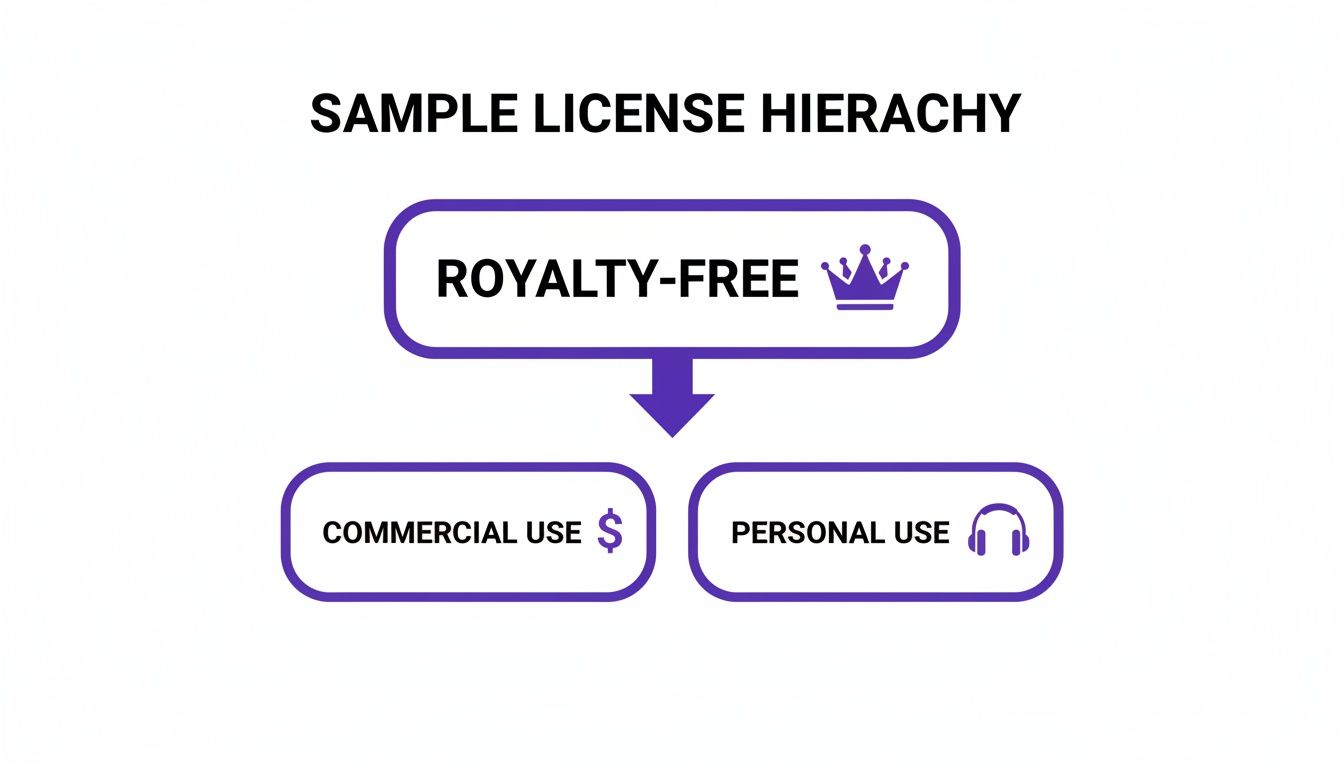
It clearly shows that even when a sample is royalty-free, the permissions for using it in a commercial track versus a personal project can be very different. It’s crucial to know the difference.
Integrating Your Library into FL Studio
Okay, your folders are set up. Now for the magic trick: getting them inside FL Studio’s Browser. This step is the key to a lightning-fast workflow, putting your entire hand-picked library just a click away so you can drag sounds right into your patterns.
Forget digging through your computer’s file explorer every single time you need a new clap. By adding your master folder to the FL Studio Browser, you’re basically creating a custom, built-in sound bank that’s perfectly tailored to your style.
Here’s how to set it up:
- Open FL Studio and look at the Browser panel on the left side.
- Click the little dropdown arrow at the top of the Browser and choose “Configure extra folders…”
- The File settings window will pop up. Click on one of the empty folder slots to open a file browser.
- Navigate to your main “DRUM LIBRARY” folder and select it.
- Close the settings window, and boom—your master folder now appears right in the FL Studio Browser.
This simple bit of setup completely changes your workflow. You can now audition and pull in the best free drum samples without ever breaking your creative focus or leaving the DAW.
Pro Tips for a Flawless Library
With a solid foundation in place, a few extra habits will take your organization from good to truly great. First, get smart with your naming. When you download a new pack, take 30 seconds to rename the files so they make sense at a glance. A file named SNARE_TRAP_GRITTY_04.wav is a thousand times more useful than SND004_final_v2.wav.
Also, don’t sleep on FL Studio’s visual tools. You can right-click any folder or file in the Browser and assign it a color. For example, try making all your “Kicks” folders red and your “Snares” folders blue. These color cues help your brain find what you’re looking for even faster, keeping you locked in and making music.
Creating Your First Beat With Free Samples
Alright, you’ve got your samples organized and locked into FL Studio’s browser. Now for the fun part—actually making something with them. This is where we go from a folder full of sounds to a hard-hitting drum loop. It’s more than just a technical exercise; it’s proof of how a clean, quality library of free samples can completely speed up your workflow.
Think of it like being a chef with all your ingredients prepped and laid out. Instead of rummaging through the pantry looking for the right spice, you can just focus on the creative act of cooking. It’s the same deal here. With your best sounds ready to go, you can lay down an idea in minutes.
Setting Up Your Project in FL Studio
First things first, let’s set the stage. The tempo is the heartbeat of your track, defining its entire vibe. We’re going for a modern hip-hop or trap feel, so let’s lock in the tempo at 140 BPM. Just type “140” into the tempo box at the top of the FL Studio window. Easy.
With our speed set, it’s time to grab our sounds. Head over to the Browser on the left, find your shiny new “DRUM LIBRARY” folder, and click into the “Hip Hop & Trap” subfolder.
Let’s pick out the core elements for our beat:
- A punchy Kick with some serious low-end thump.
- A snappy Snare that has a sharp, clean crack to it.
- A crisp closed Hi-Hat to drive the rhythm.
- A clean open Hi-Hat to add a little bounce and variation.
Just drag each of these .WAV files from the Browser and drop them right onto the Channel Rack. This is FL Studio’s main sequencer, and it’s where we’ll build the foundation of our pattern.
Here’s what your Channel Rack should look like. Your chosen samples are now loaded and ready for action. Every sound gets its own row, and that grid of buttons on the right is the step sequencer—your tool for sketching out rhythms lightning-fast.
Programming a Foundational Drum Pattern
The Step Sequencer is perfect for getting a solid groove going quickly. We’ll lay down a classic, effective four-bar pattern. All you have to do is click the buttons to light them up, telling FL Studio when to play each sound.
- Kick Pattern: Place a kick on step 1 and another on step 10. This gives you a strong, driving pulse that anchors the whole beat.
- Snare Pattern: Pop the snares on steps 5 and 13. This is the classic backbeat that creates that undeniable head-nod feel.
- Hi-Hat Pattern: Fill every other step with a closed hi-hat. This creates an eighth-note rhythm that provides the track’s main energy.
Hit the spacebar, and you should hear your first loop. It’s a simple foundation, but it’s the core of countless hit records. From here, we start adding the details that make it feel alive.
Adding Groove and Complexity
That basic pattern is solid, but it sounds a little stiff and robotic. Let’s inject some human feel and complexity using FL Studio’s Piano Roll, which gives us way more control over timing and velocity. Right-click your hi-hat in the Channel Rack and choose “Piano Roll.”
Now, let’s program a classic hi-hat roll—a signature move in modern trap and hip-hop.
- Find the last hi-hat note in your two-bar phrase.
- Select the “Slice” tool (it looks like a little knife) and right-click-drag across that note. This will chop it into smaller, faster notes, like 1/16ths or 1/32nds.
- Next, adjust the velocity (which is just the volume) of these tiny notes to create a little ramp-up or ramp-down effect. This makes the roll sound way more natural and less like a machine gun.
By manipulating timing, velocity, and note length in the Piano Roll, you move beyond simple step sequencing. This is where you inject your unique rhythmic signature into the beat, turning generic patterns into something that is distinctly yours.
This explosion in digital music production is powered by easy access to DAWs and killer samples. The global drum sets market, valued at $2,813 million in 2025, is expected to skyrocket to $4,613.7 million by 2033. This surge, especially in the Asia-Pacific region, points to a huge boom in music production as a hobby—where free samples and DAWs like FL Studio are the perfect starting point. You can explore more market insights on drum set trends for a deeper dive.
To finish off our loop, try adding an open-hat on an off-beat step, maybe step 15, to create a little lift right before the pattern restarts. You could also layer a clap on top of your snare to give it more body and a sharper attack. These small details really make a huge difference. If you’re looking for more inspiration, you might want to check out our guide on using MIDI drum patterns to instantly create complex rhythms.
Common Questions About Free Drum Samples
Diving into the world of free drum samples can feel like learning a new language. You’ll run into terms, licensing rules, and quality standards that bring up a lot of questions. Getting those sorted out is key to building a professional workflow and protecting your music.
Let’s clear up some of the most common uncertainties producers run into. Getting straight answers helps you make smart choices, dodge the usual traps, and build your sound library with total confidence.
Are All Free Drum Samples Truly Royalty-Free?
This is the big one, and the answer is a hard no. The word “free” just means you don’t pay any money to download the pack. “Royalty-free,” however, is a completely different thing—it’s a legal term that says how you’re allowed to use those sounds.
A ton of free packs are only for personal or non-commercial use. That means you can mess around with them for practice or share beats with friends, but you can’t legally drop a track using them on Spotify or sell it on Beatstars.
The safest and smartest move is to only download from sites that clearly state their samples are 100% royalty-free for commercial use. This is your legal green light to use them in songs you plan to make money from, without worrying about future fees or copyright strikes.
Always hunt for a clear licensing statement on the download page. If you can’t find one, play it safe and assume they aren’t cleared for commercial release. Just move on.
Can I Make Professional Music With Free Samples?
Absolutely. Some of the biggest hits you hear today were built with stock or free samples. The quality of your music comes down to your skill in beat-making, sound selection, and mixing—not how much you spent on your sounds.
The trick is to be picky. Zero in on high-quality .WAV files and really learn how to process them to fit your tracks. Sure, paid packs might offer more unique character or consistency, but a well-chosen library of the best free drum samples is more than enough to produce professional, release-ready music. Your creativity is always the most valuable tool you’ve got.
What Is the Best File Format for Drum Samples?
The undisputed champ and industry standard is the .WAV file format. Think of a .WAV file like a high-resolution photo; it has all the original, uncompressed data. Compressed formats like MP3 are more like low-res JPEGs—they throw away some data to shrink the file size.
That uncompressed, high-fidelity data is everything in music production. It lets you go crazy with EQ, compression, and saturation without introducing nasty digital noise or artifacts. When your samples are in .WAV format, you have total freedom to shape and mangle them into the exact sound you want. Always go for packs that offer samples in 24-bit/44.1kHz .WAV format or higher.
Quick Comparison: Free vs. Paid Drum Samples
To help you figure out when to stick with the freebies or invest in a premium pack, here’s a quick look at what you can typically expect from each.
| Feature | Typical Free Packs | Typical Paid Packs (like FL Studio Sound Packs) |
|---|---|---|
| Quality | Varies wildly from amateur to professional grade. Requires careful vetting. | Generally high and consistent, with professional processing and recording. |
| Licensing | Often unclear or restricted to non-commercial use. Requires careful checking. | Almost always 100% royalty-free for commercial use, clearly stated. |
| Uniqueness | Can be overused, as popular free packs are downloaded by thousands. | Often offers more unique, niche, and character-filled sounds. |
| Organization | May have inconsistent naming conventions and messy folder structures. | Usually well-organized with clear labels, saving you valuable time. |
| Support | No support available. You’re on your own if issues arise. | Often includes customer support and access to updates or tutorials. |
While free packs are an amazing starting point, investing in paid packs gives you a reliable foundation of unique, high-quality, and legally-cleared sounds, letting you focus more on making music.
How Do I Make My Free Samples Sound Unique?
This is where your artistry as a producer really comes out to play. The whole point is to turn a common sound into something that is signature to your music. Never be afraid to get weird and avoid using samples straight out of the box.
Here are a few powerful techniques to try right in FL Studio:
- Layering: Stack multiple sounds to create one bigger, better sound. Try layering a sharp clap over your snare for more snap, or mix a deep sub-kick under your main kick for a massive low-end.
- Pitch and Envelope: Jump into the sampler channel settings and tweak the pitch. You can also shape its volume envelope (Attack, Decay, Sustain, Release) to completely change its length and impact.
- Effects Processing: This is where the magic happens. Use EQ, compression, saturation, and distortion to totally transform a sample’s texture. A little creative reverb or delay can take a dry sound and put it in a brand-new space.
- Creative Chopping: Drag a drum loop into Edison or right onto the playlist and grab the slice tool. Chopping it up and rearranging the pieces is a classic hip-hop trick for flipping a sample into a completely new rhythm.
By mixing these methods, you can make sure that even the most downloaded free drum samples sound fresh and completely original in your tracks.
Ready to stop searching and start creating? At FL Studio Sound Packs, we’ve curated a massive library of 100% royalty-free drum kits, loops, and MIDI files designed to give your beats a professional edge right out of the box. Get instant access to our entire catalog and unlock your sound today.