
Your Ultimate Guide to Free FL Studio Drum Kits
Let’s be real—a killer drum groove is the heart and soul of a track. It’s the first thing that gets heads nodding. For both newcomers and seasoned producers, high-quality, free FL Studio drum kits are a secret weapon. Sure, you can spend a fortune on premium packs, but there’s an incredible amount of top-tier stuff out there for free if you know where to dig.
Why a Good Free Drum Kit is a Producer’s Best Friend
Finding the right drum sounds isn’t just a small step; it’s the foundation of your entire beat. The right kick and snare combo can define the genre, drive the energy, and set the whole mood before you even add a single melody.
The rise of home studios has completely changed the game. More people are making music than ever before, and this has created a huge community of artists and sound designers who share their work for free. Think of it as producers helping producers. In fact, sales of electronic drum kits jumped by nearly 35% between 2020 and 2023. That explosion in digital music creation is exactly why the quality and availability of free resources have skyrocketed.
What Separates a Great Free Kit from a Bad One?
Not all free kits are worth your hard drive space. To avoid cluttering your library with junk, here are a few things I always look for:
- Sample Quality: The sounds need to be clean. I’m talking about crisp, punchy, high-fidelity WAV files. If you hear nasty digital clipping or background noise, just move on.
- Genre Authenticity: The kit should deliver on its promise. If it’s labeled “Trap,” I expect to find booming 808s and razor-sharp hi-hats. A “Lo-Fi” pack better have some dusty, vinyl-textured snares and warm kicks.
- Clear Licensing: This is the big one. Always, always look for kits that are explicitly labeled “100% royalty-free.” This is your green light to use these sounds in your music—even in songs you sell—without worrying about legal trouble down the road.
A small, curated library of amazing free sounds is way more powerful than a massive folder of mediocre ones. Don’t be a sample hoarder. Find a handful of go-to kits that really nail your style and learn them inside and out.
Where to Actually Find Safe, High-Quality Kits
Searching for free FL Studio drum kits can feel like navigating a minefield of sketchy websites and broken download links. The trick is to stick with sources that have a reputation to uphold.
I always recommend starting with established music production blogs, reputable sample companies, and active producer communities on platforms like Reddit. These places often give away free “taster” packs to show you the quality of their premium products, so they have a real incentive to make them good. It’s a win-win: you get pro-level sounds, and they get a potential customer. It’s a much safer bet than downloading from a random link.
For a consistently updated source, you can also check out the rotating selection of freebies in our guide to FL Studio Sound Packs. This approach saves you the headache of hunting and ensures you’re getting quality sounds without any of the risks.
A quick look at some of the most reliable sources can give you a better idea of where to start your search. Each platform has its own strengths, catering to different styles and needs.
Top Sources for Free FL Studio Drum Kits at a Glance
| Source | Primary Genre Focus | Key Benefit |
|---|---|---|
| FL Studio Sound Packs | Hip-Hop, Trap, R&B | Professionally curated kits, often featuring free rotations of premium content. |
| Splice | All Genres | Offers a massive library with a “free packs” section from top-tier labels. |
| Producer Grind | Trap, Hip-Hop, Drill | Community-focused, with kits from well-known producers in the genre. |
| Cymatics | EDM, Dubstep, Trap | High-energy, polished sounds perfect for modern electronic music production. |
| r/Drumkits (Reddit) | Varies Widely | A user-driven community sharing unique and often niche-specific drum kits. |
Ultimately, building your perfect drum library is a personal journey. By focusing on these trusted sources, you can spend less time searching and more time creating.
Alright, you’ve done the digging, found some killer free FL Studio drum kits, and unzipped them. Now you’ve got a folder full of potential sitting on your desktop. Don’t let it die there—that’s a classic workflow killer. The next move is getting those sounds into your DAW so you can actually start cooking.
The absolute best way to do this is by adding your new sound folder directly to FL Studio’s Browser. This little trick makes all your new drums feel like they were part of FL Studio from the beginning, just a drag-and-drop away from any project.
This whole process is simpler than you might think.
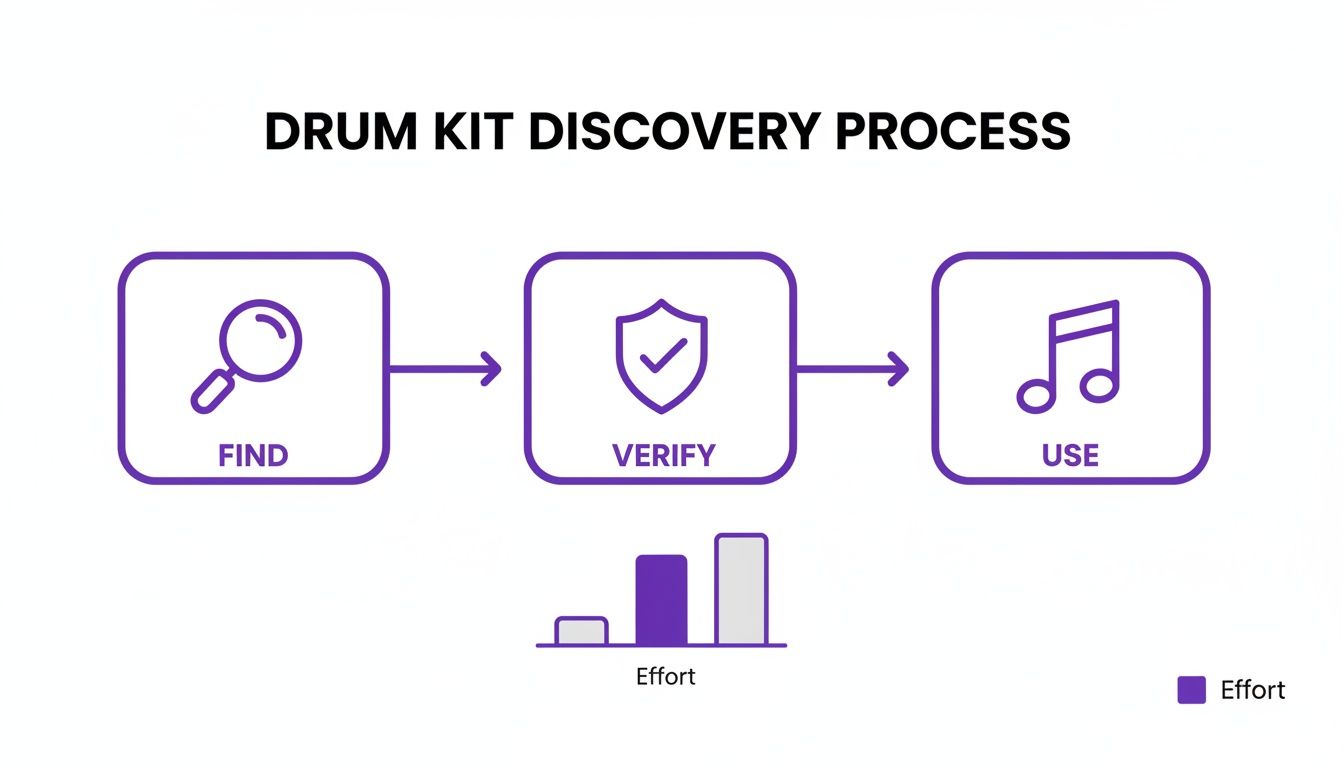
As you can see, the real work isn’t just grabbing sounds. It’s about properly verifying them and, more importantly, integrating them into your creative flow.
Adding Folders to the FL Studio Browser
Making your new drum kit a permanent fixture in your FL Studio setup is surprisingly easy. You just have to point the software to where you keep your custom sounds.
- First, open up FL Studio and head to Options > File Settings.
- Look for the section called “Browser extra search folders” and click on an empty folder icon.
- Just navigate to where you saved your new drum kit folder and select it.
- Boom. That folder will now pop up in the Browser on the left side of your screen, ready for you to access and preview every sample without ever leaving your project.
Trust me, this one-time setup is a massive time-saver. No more digging through your computer every time you need a new snare; your whole library is right there in the DAW.
Here’s a pro tip: I highly recommend creating one main “Custom Samples” folder on your hard drive. Add just that single folder to FL Studio. Inside that main folder, you can organize all your downloaded kits by genre, artist, or whatever makes sense to you. This keeps your FL Studio Browser clean and prevents it from getting swamped with dozens of individual folder entries.
Loading Samples Manually for Quick Use
Sometimes you just need one specific sound and don’t feel like adding a whole new folder. For those moments, the Channel Rack is your best friend.
You can literally just drag any WAV file from your computer’s file explorer and drop it right onto an empty channel in the Channel Rack. FL Studio instantly creates a new sampler channel for that sound. It’s the perfect method for quickly auditioning new sounds or for those one-off uses where you don’t need the entire kit loaded up. If you want to dive deeper into this, check out our in-depth guide on how to use samples in FL Studio.
Building a Performance Kit with FPC
For all the producers out there who love to play their beats live on a MIDI controller, the FPC (Fruity Pad Controller) is your go-to tool. Think of it as your own personal drum machine right inside FL Studio. You can build a completely custom kit by assigning your fresh new samples to different pads.
Just load an instance of FPC into the Channel Rack. From there, you can drag individual drum samples from the FL Studio Browser (or even your desktop) directly onto the FPC pads. Map your kicks, snares, hats, and percussion exactly how you want them. This gives you a hands-on, performance-ready way to interact with your free FL studio drum kits and really feel the groove.
Building an Organized Sound Library That Inspires
It’s an amazing feeling to download a bunch of new, free FL Studio drum kits. But that initial rush can quickly turn into a digital headache. Before you know it, you’ve got a chaotic mess of folders, and you’re spending more time searching for the right snare than you are actually making music. We’ve all been there, and it’s a massive creativity killer.
This is about more than just being neat; it’s about building a system that lets you move at the speed of inspiration. When an idea strikes, you need to be able to grab the sounds you hear in your head instantly. A well-structured library is easily one of the most underrated production tools you can have in your arsenal.
Find Your Organizational Method
There’s no single “right” way to organize your sounds. The best system is the one that clicks with how your brain works. Most producers tend to gravitate toward one of three main approaches.
- By Genre: This is perfect if you jump between different styles. Create top-level folders for things like “Trap,” “Lo-Fi,” “House,” and “Drill.” When you need a specific vibe, you know exactly where to go.
- By Type: My personal favorite. Structure everything by the type of sound—”Kicks,” “Snares,” “808s,” “Percussion,” etc. This is a game-changer for layering and sound design because you can quickly audition dozens of similar sounds back-to-back.
- By Pack: This is the simplest method: just keep the original folder names like “Cymatics – Trap Starter Pack.” It’s fast, but it can get messy once you’ve downloaded 50 packs and can’t remember what’s in each one.
Pick one method and commit to it. Consistency is everything here. You’re building muscle memory that will eventually let you navigate your library on autopilot.
Use FL Studio’s Built-In Tools
Don’t sleep on FL Studio’s Browser—it’s way more powerful than most people realize. It has some killer features designed specifically to help you get to your favorite sounds faster.
Right-click on any sample or folder in the Browser and you can assign it a color. It’s a simple visual trick, but it’s incredibly effective. I color-code my absolute favorite kicks red and my go-to snares blue, and it saves me countless clicks in every session.
Make sure you’re also using the “Favorite” feature. When you add a folder as a favorite, it gets pinned right to the top of the Browser list for one-click access. This is a must for the handful of kits you find yourself reaching for in almost every project.
Create Your Own ‘Starter Kits’
Okay, here’s a pro tip that will seriously change your workflow: build your own curated “starter kits.” Once you find a kick, snare, and hi-hat combo that just works, save it as a new project template or a channel state.
This isn’t just about saving time; it’s about carving out your signature sound. The demand for unique percussion is exploding, with the digital drum kits market projected to hit USD 254.3 million by 2025. By curating your own kits from the best free samples you find, you’re building a unique sonic identity that will make your music stand out. You can learn more about the growth in the digital drums market if you’re curious.
Instead of starting a new track by building a drum rack from scratch, you just load up your pre-made kit. Boom. You have an instant foundation to build on, letting you jump straight into the fun, creative parts of making a beat. It’s a professional habit that pays off every single time you open FL Studio.
Making Your Free Drums Sound Professional
Grabbing a great free drum kit is a fantastic start, but it’s really just that—a start. The real magic, the stuff that makes a track feel finished, happens when you start shaping those raw sounds to sit perfectly in your mix. Let’s be real: professional drums are almost never a single, perfect sample pulled from a folder. They’re built.
The whole art of drum production is about creating a sonic character that serves the song. It’s about taking good sounds and making them great by combining textures, dialing in the perfect amount of punch, and giving them a real sense of space. My advice? Don’t be afraid to get weird with it. Some of the best drum sounds I’ve ever made were happy accidents discovered through pure experimentation.
The Power of Layering Samples
Layering is one of the most fundamental skills in modern production. Instead of wasting hours hunting for that one “perfect” snare, you can just build it yourself by blending the best parts of two or three different samples. This puts you in complete control.
A classic move is to blend a snare with a sharp, modern transient for its initial crack with a fatter, more vintage-sounding snare to give it body and warmth.
- For the “Crack”: Find a snare that has a bright, snappy attack. This is what’s going to slice through the mix and grab the listener’s attention.
- For the “Body”: Look for another snare with a nice, full tone and a bit of sustain. This gives your sound weight and presence.
- Combine and Refine: Drop both samples into your Channel Rack. You might need to nudge the timing or pitch of one layer to make sure they sound cohesive and don’t have weird phasing issues. Then, just balance their volumes until they sound like one, powerful snare that’s better than either sample was on its own.
You can apply this exact same logic to kicks, claps, and even hi-hats. By layering, you can craft a signature drum palette that is 100% yours, turning any folder of free FL Studio drum kits into a beast of a custom instrument.
Essential Processing with Native Plugins
You absolutely do not need a folder full of expensive, third-party plugins to make your drums hit hard. FL Studio’s stock tools are more than capable of delivering pro-level results once you get the hang of them.
First things first: route each drum element—kick, snare, hats—to its own individual mixer track. This is non-negotiable. You need that granular control to sculpt a clean and powerful mix.
My go-to chain for pretty much any drum sound is dead simple but wildly effective: EQ, then compression. I’ll use Fruity Parametric EQ 2 to carve out nasty frequencies and boost the sweet spots. Right after that, Fruity Compressor adds punch and tames the dynamics. It’s a foundational combo that just works, every single time.
A super common and useful trick is to find where your kick drum’s fundamental frequency lives and carve out a small pocket for it in your bassline’s EQ. This tiny move prevents your low-end from turning to mud and gives the kick a clean, impactful lane to punch through. Mastering these small but critical adjustments is key to a polished sound. Pair these techniques with the right patterns, and your drums will truly come alive. For some inspiration, check out our collection of MIDI drum patterns.
Advanced Techniques for Extra Polish
Once you’ve got the basics down, you can start playing with more advanced techniques to add that final 10% of professional sheen. Parallel compression, sometimes called “New York” compression, is an amazing way to add serious weight and energy to your entire drum bus without killing your transients.
It’s simple: you send your main drum mix to a separate bus, absolutely smash it with a compressor, and then slowly blend that heavily compressed signal back in underneath the original, uncompressed drums. This adds a thick, energetic layer that makes your drums feel massive.
On top of that, a little bit of saturation from a plugin like Fruity Fast Dist can add some really pleasing harmonic distortion. This can give your clean, digital drums a warmer, more analog vibe that helps them sit more naturally in the mix.
Navigating Sound Kit Licensing Like a Pro
Finding a fire free FL Studio drum kit is only half the job. Honestly, understanding what you can legally do with those sounds is what separates the hobbyists from producers building a real career.
This isn’t just boring legal talk; it’s about protecting your music and your future. The last thing you want is a copyright claim popping up when your track hits a million streams, all because you skipped over a license file.
This is more important than ever. The drum set market is projected to swell to around USD 2.5 billion by 2025, largely because producers like us are choosing digital flexibility over expensive acoustic kits. Digital sounds are big business, and you need to treat them that way. If you’re curious about the industry’s shift, you can discover more about the drum industry’s expansion and see just how much digital production is taking over.
Understanding the Key Licensing Terms
Before you hit “download” on another pack, you need to know the lingo. Not all “free” kits give you the same permissions, and a simple misunderstanding can turn into a very expensive mistake down the road.
- Royalty-Free: This is the one you want to see. It means you can drop those sounds into your commercial releases—think Spotify, Apple Music, and sync placements—without owing the creator a single penny from your earnings. You get the license for free and can use the sounds in your music forever.
- Creative Commons (CC): This one’s a bit of a mixed bag. CC is a whole family of licenses. Some allow full commercial use, while others might require you to credit the creator or prohibit you from chopping up or altering the sound. Always click to see the specific CC license details.
- For Non-Commercial Use: This is a huge red flag for any serious producer. It’s a dead end. It means you can mess around with the sounds for practice, but you absolutely cannot use them in any song you plan to sell, stream, or monetize in any way.
My number one rule: Always look for a “license.txt” or “read me” file inside the zip folder. Any legit creator will include one. If you can’t find any licensing info on the download page or in the files, the safest move is to assume it’s not cleared for commercial use. Just delete it and find another kit.
How to Stay Protected
Protecting your work is really just about building a good habit. Before you even drag a sample into your FL Studio project, just take 30 seconds to double-check its usage rights. Look for clear, explicit terms like “100% royalty-free” on the download page.
Use your gut. If a site looks sketchy or an offer seems way too good to be true (like an entire Metro Boomin library for free), it definitely is. Stick to trusted sources where the licensing is crystal clear and right there on the page.
When you build your career on a solid legal foundation from day one, you ensure that when your music finally blows up, you’re the one who gets paid.
Got Questions About Free Drum Kits? Let’s Clear Things Up.
Even after you know where to look, grabbing free samples online can feel a little like the wild west. It’s totally normal to have a few lingering questions before you start building up your sound library. Let’s tackle some of the most common ones producers run into.
Getting these details straight from the jump will help you download with confidence, so you can spend less time worrying and more time making beats.
Are Free FL Studio Drum Kits Actually Safe to Download?
For the most part, yes—but you absolutely have to use your best judgment. The real trick is sticking to places that have a solid reputation. Think established producer hubs like Reddit’s r/Drumkits, well-known sample companies offering free taster packs, or the official websites of sound designers you trust.
If a site feels sketchy, it probably is. Be wary of any page that spams you with pop-up ads or demands a bunch of personal info just for a simple download. Those are major red flags.
A great habit to get into is scanning any downloaded ZIP file with your antivirus software before you even think about extracting it. It’s a tiny step that can save you a massive headache down the line.
How Can I Be Sure a Drum Kit Is Royalty-Free?
This is easily the most important question of them all. Any legitimate creator or company will make their licensing terms crystal clear. The first thing you should look for inside the downloaded folder is a “license.txt” or “read me” file.
On the download page itself, you should see explicit phrases like “100% royalty-free” or “cleared for commercial use.”
If the licensing info is vague, buried in fine print, or just plain missing, you have to assume the sounds are not cleared for you to use in a song you plan to release. It’s just not worth the legal risk.
Using uncleared samples can get your tracks pulled down or, worse, lead to legal trouble if your song takes off. There are countless amazing, properly licensed free FL Studio drum kits out there, so there’s zero reason to gamble.
Can I Use These Free Drum Kits in Any Music Genre?
Absolutely. This is where your creativity as a producer really gets to shine. A lot of free kits might be labeled for a specific genre like Trap or Lo-Fi, but those individual sounds are just raw ingredients waiting for you to cook them up into something new.
Never let a folder’s name put you in a creative box. The moment you start processing and manipulating the sounds, the possibilities become endless.
- Pitching: Take a deep, booming Trap 808 and pitch it way up. Suddenly, you have a tight, punchy kick perfect for a House track.
- Layering: That thin, crackly snare from a Lo-Fi pack might sound weak on its own. But layer it with a sharp clap, and you’ve got a powerful backbeat for a Pop anthem.
- Effects: A boring, standard hi-hat can become an atmospheric texture for an ambient piece just by running it through some heavy reverb and delay.
Your DAW is a sonic playground. Use the powerful tools right inside FL Studio to twist, shape, and completely reimagine any sound to fit the track you hear in your head.
Ready to stop searching and start creating? FL Studio Sound Packs offers a massive, professionally curated library of 100% royalty-free drum kits, loops, and MIDI files to give your productions an instant edge. Explore our complete collection of sound packs today.