
The Producer’s Guide to Crafting Perfect 808 Kick Drums
More than just a low-end thump, the 808 kick drum is the foundation of modern music. It’s both the percussive punch and the melodic bassline, a dual-threat sound that defines entire genres like trap, hip-hop, and pop.
The Unmistakable Power of Modern 808s
Let’s be real: the 808 is a sonic signature. Its power comes from doing two critical jobs at once. That sharp initial transient delivers the rhythmic pulse of a kick, while the long, booming sub-bass tail carries the weight and melody of a bassline. This one-two punch is exactly what makes a great 808 feel so huge and emotionally impactful.
For any producer trying to make contemporary-sounding music, mastering the 808 isn’t optional—it’s essential. It’s not just about grabbing a good sample. It’s about knowing how to shape it, tune it, and mix it so that it literally moves the listener. A well-placed 808 can make a sparse beat feel full and heavy, but a bad one will turn your mix into a muddy disaster in a heartbeat.
From Niche Machine to Global Staple
The journey of the 808 from an overlooked drum machine to a worldwide phenomenon is a testament to producer creativity. The original Roland TR-808, released back in 1980, was actually a commercial flop.
But as secondhand units got cheap—we’re talking under $100—they fell into the hands of hip-hop pioneers. Afrika Bambaataa’s 1982 classic “Planet Rock” put that 808 kick front and center, launching the sound into the mainstream and cementing its place in music history. A quick search will pull up tons of info on this iconic machine’s story.
This history lesson reveals something crucial about the 808’s identity: its insane adaptability. Producers took a sound meant for one thing and completely repurposed it, transforming the kick drum’s long decay into a tunable bass instrument.
At its core, a great 808 serves as the track’s heartbeat and its soul. The transient gives it the pulse, but the sub-tail gives it the feeling. Getting both right is the key to making beats that hit hard on any system.
Why the 808 Dominates Modern Production
The 808’s reign continues for a few simple reasons. Its clean, almost sinusoidal sub-bass provides a pure, powerful low-end that you just can’t get from most other instruments. It’s the perfect canvas.
Here’s the breakdown of why producers keep coming back to it:
- Rhythmic and Melodic Duality: It handles both kick and bass duties, which cleans up the arrangement and creates a super cohesive low end.
- Massive Sub-Bass Presence: That deep fundamental frequency can physically move air, creating an immersive, chest-rattling experience on a good sound system.
- Sharp, Mix-Cutting Transient: The initial “click” or “knock” is key. It helps the 808 slice through a busy mix so you can hear it even on laptop speakers or earbuds.
- Creative Flexibility: You can take an 808 anywhere. Keep it clean and deep, or distort it into an aggressive, snarling monster. It can be shaped to fit almost any vibe. Just listen to the versatility in these hip-hop drum sounds to hear what I mean.
This guide is all about giving you practical, step-by-step techniques to create, process, and mix 808s that sound professional and hit hard, every single time.
Crafting Your Signature 808 From Scratch
While high-quality sample packs are an incredible starting point, nothing beats the creative freedom of designing your own 808 kick drums from the ground up. When you build an 808 yourself, you get to dial in the perfect character, length, and punch for your specific track. The best part? You don’t need fancy plugins. A simple stock synthesizer, like FL Studio’s 3x Osc, has everything you need to get started.
At their core, 808s are really just two things: a punchy transient and a long, sustained sub-bass tail. By building these elements yourself, you get total control over how they work together, giving you a truly custom sound nobody else has.
Building the Sub-Bass Foundation
The heart and soul of any great 808 is its deep, resonant body. This is the part of the sound that shakes the room and gives a track its low-end power. We’ll kick things off by creating this element with a pure sine wave, which gives us the cleanest and most powerful fundamental frequency to work with.
In a synth like 3x Osc, the process is pretty straightforward:
- Select a Sine Wave: First things first, set your oscillator to a simple sine wave. This pure tone is the perfect blank canvas for creating deep sub-bass without adding any muddy, unwanted harmonics right off the bat.
- Shape the Amplitude Envelope: This is where you tell your 808 how to behave over time. A classic 808 has a lightning-fast attack, full sustain, and a controllable decay and release. Set the attack to zero, crank the sustain to the max, and then play with the decay and release times. These last two knobs will determine how long the 808’s tail rings out. A longer release is killer for sparse beats, while a shorter one keeps things tight for faster, more rhythmic basslines.
After this step, you’ll have a clean sub tone. Play it on your MIDI keyboard and you can already hear the foundation of your custom 808 taking shape. Now, let’s add that all-important punch.
Pro Tip: Hold off on distortion or saturation for now. The goal here is to create a clean, powerful, and perfectly shaped sub-tail. All the grit and vibe can be added later on during the processing stage.
Dialing in the Perfect Punch with a Pitch Envelope
That iconic 808 “knock” or “thump” actually comes from a super-fast drop in pitch right at the beginning of the sound. This quick pitch modulation creates a percussive transient that helps the 808 slice through the mix. Without it, you just have a plain old sub-bass note.
Here’s how you can create that essential punch using a pitch envelope:
- Engage the Pitch Envelope: Find the pitch envelope or modulation envelope section in your synth and turn it on.
- Set a Fast Decay: You want that pitch to drop almost instantly. Set the envelope’s decay time to be very short—somewhere between 20ms and 50ms is a great place to start. Your attack and sustain knobs should be at zero.
- Adjust the Amount: The envelope’s “amount” or “depth” controls how high the pitch starts before it drops down to the note you’re playing. A higher amount will give you a more aggressive, clicky transient, while a lower setting results in a softer, boomier punch.
Experimenting with that pitch decay is where the magic really happens. A super-fast decay gives you that tight, modern trap 808 sound. Slow it down just a touch, and you’ll get the lazier, deeper boom you hear in classic hip-hop.
This simple process breaks the 808 down into its core components, from the initial transient to its role as a melodic bassline.
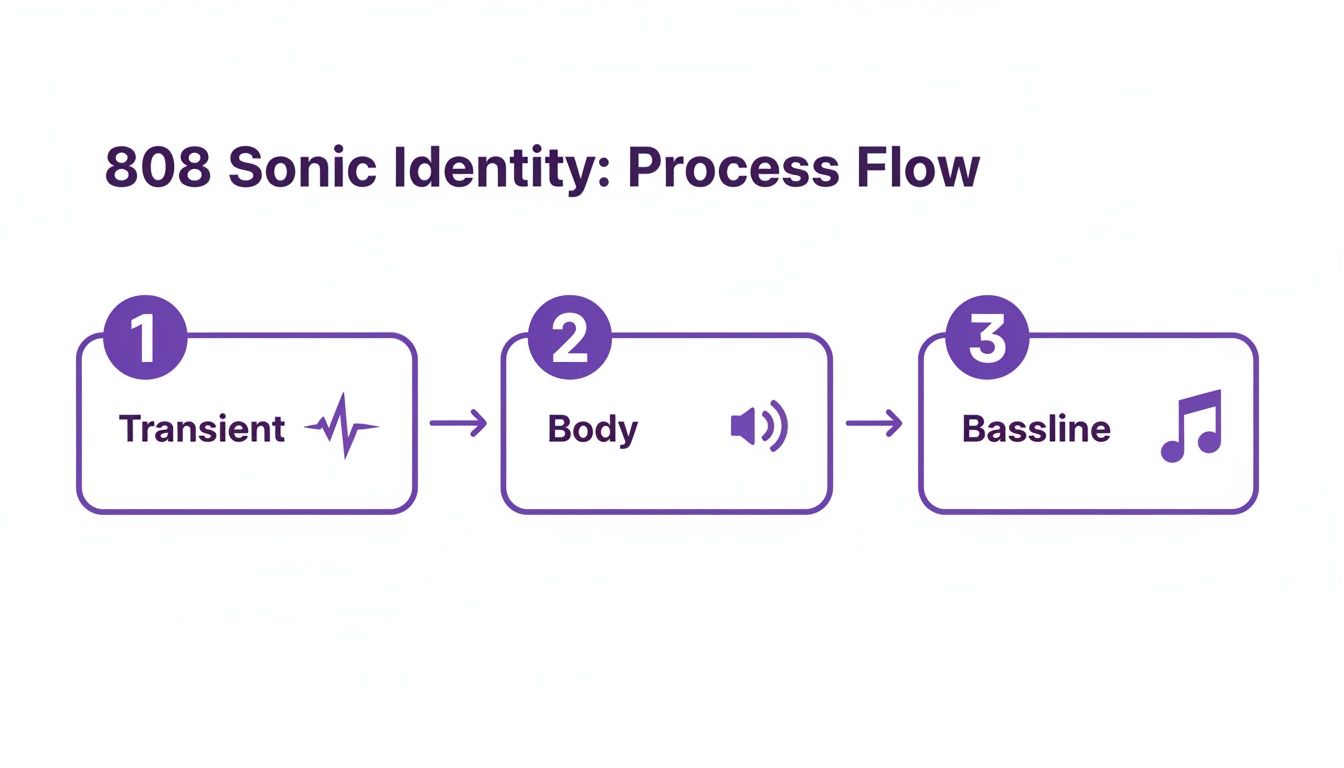
This visual shows exactly how that sharp transient, the sustained body, and its melodic function as a bassline all come together to create the complete 808 we all know and love.
Adding an Extra Layer of Attack
Sometimes, especially in a busy mix, the pitch envelope alone might not provide enough “click” for the 808 to be heard on smaller speakers like laptops or phones. A fantastic trick is to layer a totally separate sound source just for that initial transient.
This could be anything from a short burst of white noise to a heavily filtered kick drum sample. The key is to make this layer extremely short and focused on the high-mid frequencies.
- Noise Layer: Use a second oscillator in your synth to generate a tiny bit of white noise. Slap a separate, very fast amplitude envelope on it so the noise only lasts for a few milliseconds right at the start of the 808.
- Sample Layer: Grab a punchy kick sample that has a strong attack. Use a high-pass filter to chop off all its sub-bass, leaving you with just the “click.” Layer this right on top of your synthesized 808.
This layering technique gives you independent control over the punch and the body of your 808 kick drums. This makes it way easier to mix and shape the sound to fit perfectly in any production.
Choosing and Layering the Right 808 Samples
Sure, synthesizing your own 808 from the ground up gives you ultimate control, but let’s be real—sometimes you just need to get an idea down fast. This is where a well-curated sample library becomes a producer’s best friend.
Knowing how to dig through your packs and quickly pick the right 808 kick drums is a skill that can give you a massive, professional sound in minutes. The secret isn’t just finding a cool sound; it’s about knowing what to listen for before you even drag it into your project.
What Makes a Great 808 Sample
When I’m sample hunting, I’m listening for specific qualities that will make my life easier during the mixdown. It’s all about starting with the best possible source material. A truly great 808 sample is clean, powerful, and versatile—a solid foundation you can build on, not a problem you have to fix.
Before you commit, give the sample a quick audition and listen for these key elements:
- A Clean Sub-Tail: Pay close attention to the sustained part of the 808. It should be a pure, deep tone without any weird digital artifacts, phasing issues, or mud. A messy tail will only create problems later.
- A Well-Defined Transient: The initial “punch” or “click” needs to be clear. A mushy transient will get completely lost in a busy mix, while an overly harsh one just sounds cheap and brittle. You want presence, not pain.
- A Strong Fundamental Tone: The sample has to have a clear, identifiable pitch. This is non-negotiable for tuning the 808 to the key of your track. Samples with a weak or wobbly fundamental are a nightmare to work with and will weaken your entire low end.
Before you start building your track, it helps to have a quick mental checklist. Here’s a simple table to guide your selection process.
808 Sample Selection Checklist
| Characteristic | What to Listen For | Common Pitfalls to Avoid |
|---|---|---|
| Sub-Tail Purity | A smooth, consistent low-frequency tone. | Unwanted noise, digital artifacts, or excessive distortion in the decay. |
| Transient Impact | A clear, punchy attack that cuts through. | A weak, “mushy” start or an overly sharp, “clicky” transient. |
| Pitch Clarity | An easily identifiable and stable musical note. | Vague or wavering pitch that makes tuning difficult or impossible. |
| Length & Decay | A tail that’s long enough to be versatile but not overly boomy. | A decay that’s too short for held notes or so long it muddies the mix. |
| Mono Compatibility | The sample sounds solid and doesn’t thin out when played in mono. | Wide stereo 808s that disappear or cause phase issues in mono. |
Keeping these points in mind will save you countless hours of fixing problems that could have been avoided by simply choosing a better sample from the start.
The Art of Layering for Punch and Body
Layering is how you get that perfect “best of both worlds” 808. The classic move is to layer a punchy acoustic or electronic kick right on top of a deep 808 sample. This gives you the sharp, cutting transient from the kick and the heavy, sustained sub-bass from the 808.
But just dropping two sounds on top of each other is a recipe for a muddy disaster. Phase cancellation and frequency clashes will turn your low end into a mess. The secret is to treat each layer as its own instrument, carving out space so they can coexist. Think of it like a puzzle: the kick provides the top-end “click,” and the 808 provides the low-end “boom.” Your job is to make them fit together perfectly.
A Practical Workflow for Clean Layers
To make sure your layered 808 hits hard without turning into mud, you need a system. This approach prevents the low frequencies of each sound from fighting each other, which is the number one cause of a weak low end.
Here’s the workflow I use all the time in FL Studio to get clean, powerful layers:
- Pick Your Players. Find a kick with a transient you love and an 808 with the perfect sub-tail. Don’t worry if the 808’s own transient is weak—we’re about to replace it.
- Isolate the Frequencies. Slap an EQ on both channels. For the kick, use a high-pass filter to aggressively cut everything below 100-150 Hz. On the 808, use a gentle low-pass filter to roll off the highs and make room for the kick’s attack.
- Shape the Transients. On the 808 channel, use an envelope or transient shaper to soften its initial attack just a tiny bit. This allows the kick’s transient to punch through cleanly without any conflict.
- Check for Phase. This is crucial. Zoom way in on the waveforms and make sure their initial peaks align. Sometimes, nudging one sample forward or backward just a few milliseconds can dramatically tighten up the sound. Listen for the spot where they hit the hardest together.
This method gives you complete control. By treating each layer as a distinct component, you can build a custom 808 that’s bigger and punchier than any single sample. If you’re looking for great sounds to get started with, our guide on essential trap drum kits is packed with samples that are perfect for layering.
Tuning Your 808s for Musical Impact
Nothing kills the vibe of a track faster than an 808 that’s out of tune. When that foundational bass note clashes with your chords and melodies, the whole production just feels off—amateurish and jarring. Tuning your 808 kick drums isn’t just a nerdy technical step; it’s absolutely fundamental to making your low end hit hard and feel musical.
An 808 that isn’t in key creates a nasty dissonance, a subtle (or sometimes not-so-subtle) tension that pulls the listener right out of the groove. Getting your 808 to follow the key of your song is the first move toward a clean, professional mix where the bass actually supports the track instead of fighting against it.
Finding the Root Note of Your 808 Sample
Before you can even think about writing a bassline, you have to know what note your 808 sample is playing. A lot of sample packs are pretty good about labeling the key of each sound, but you can’t always trust it. It’s a non-negotiable best practice to always check for yourself.
Thankfully, most DAWs make this super simple. Here are a couple of my go-to methods in FL Studio:
- Use a Tuner Plugin: Just drop a visual tuner plugin like GTune (it comes stock with FL Studio) or any third-party guitar tuner onto your 808’s mixer channel. Play the sample, and the tuner will tell you exactly what note it’s hitting. This is by far the most accurate way.
- DAW Pitch Detection: Most samplers have this feature built-in. In FL Studio, you can right-click the waveform in the channel sampler and hit “Edit in audio editor (Edison).” From Edison’s menu, click the little flag icon and choose “Detect pitch regions.” This will map out the fundamental note of your sample.
Once you know the root note, just tweak the sample’s pitch knob until it lines up with the key of your song. For example, if your sample is a G but your song is in C minor, you’ll need to pitch it up or down to C.
I see this mistake all the time: producers assume every 808 sample is tuned to C. Always take the extra 10 seconds to check. This one simple habit will save you from a world of mixing headaches later on.
Crafting Melodic 808 Basslines in the Piano Roll
Okay, now that your 808 is properly tuned to your track’s root note, the real fun begins. You can start programming it in the piano roll just like any other melodic instrument. This is where you create basslines that give your track that essential movement and emotion, bridging the gap between pure rhythm and melody.
Don’t just stick to playing the root note over and over. A truly great 808 bassline often follows the chord progression, laying down a solid foundation that the other instruments can sit on top of. Mess around with different rhythms and patterns to feel out how they completely change the groove of your beat.
The Art of 808 Slides and Glides
Those slick, bending transitions from one note to another? That’s the signature sound of modern trap and hip-hop. This effect, known as slides or glides, adds a smooth, almost vocal-like quality to your basslines that you just can’t get any other way.
Programming these is pretty straightforward in most DAWs.
- Enable Portamento/Glide: Dive into your sampler’s settings and look for a switch to enable “Portamento” or “Glide.” This tells the sampler to slide between any overlapping notes instead of just triggering a new sound.
- Use Slide Notes: In FL Studio’s Piano Roll, there’s a dedicated “slide note” tool. You lay down your main note, then place a slide note right on top of it. The 808 will then smoothly glide from the main note’s pitch to the slide note’s pitch. Pro tip: the length of that slide note controls how fast the glide happens.
This technique is your secret weapon for adding expressive fills and transitions that make your 808 patterns feel alive.
Common Pitching Mistakes to Avoid
While getting your 808 in tune is crucial, it’s easy to go too far. Pitching a sample too drastically in either direction can introduce some nasty digital artifacts and totally gut the power of the sound.
- Pitching Too High: If you push an 808 up an octave or more, it starts to sound thin and weak. It loses all its sub-bass power and you get that dreaded “chipmunk effect.”
- Pitching Too Low: On the flip side, dropping an 808 way down the keyboard can push its fundamental frequency below the range of human hearing (around 20 Hz). The sound will lose all its punch and just disappear on most speakers.
If you find yourself needing a note that’s way outside the sample’s original range, your best bet is to just find a different 808 sample that’s already closer to your target pitch. This way, you get to keep the full weight and character of the sound intact.
Mixing Your 808s to Cut Through Any Speaker
You’ve designed, chosen, layered, and tuned your 808. Now for the moment of truth: making sure it actually hits everywhere. An 808 that shakes your studio monitors but vanishes on a phone is a failed 808, plain and simple.
This final mixing stage is all about translation. We need to preserve that deep, chest-rattling sub-bass while adding just enough character higher up the frequency spectrum so it’s audible on even the tiniest speakers. Let’s get into the techniques that turn a good 808 into the dominant force in your mix.
Adding Harmonics with Saturation
Here’s the biggest problem with 808s: most consumer devices can’t even reproduce their fundamental frequencies. The secret to making your 808 pop on a laptop isn’t cranking the lows—it’s adding higher frequencies using saturation.
Saturation creates subtle harmonic overtones that are mathematically related to the 808’s root note. So, even if someone’s earbuds can’t play the deep 50 Hz tone, their brain hears the 100 Hz, 150 Hz, and 200 Hz harmonics we just added and “fills in the blanks,” perceiving the missing sub. It’s a powerful psychoacoustic trick.
Plugins like FL Studio’s Fruity Fast Dist or third-party legends like FabFilter Saturn and Soundtoys Decapitator are your best friends here. Start with a very gentle setting and slowly dial it in until the 808’s tone is clear on small speakers, but without it turning into a fuzzy, distorted mess.
Remember, the goal isn’t always aggressive distortion (unless that’s your vibe). We’re adding just enough harmonic color for the 808’s pitch and presence to cut through, even when its foundational sub-bass is completely gone.
Carving Out Space with EQ
For an 808 to sound truly massive, it needs its own personal space in the low end. If it’s fighting for room with the kick, a synth bass, or even the muddy low-end of pads, your whole mix will sound undefined and weak. This is where surgical EQ becomes absolutely essential.
Think of it as managing sonic real estate. The 808’s prime territory is usually between 40 Hz and 80 Hz. Your job is to evict everyone else from that zone.
- On the Kick Drum: Use a high-pass filter to gently roll off the deep sub-bass below 40-50 Hz. The kick’s actual punch is higher up, around 100-200 Hz, so you can make this cut without losing its impact.
- On Other Bass Elements: If you have another bassline, you have to decide which one gets to own the sub-frequencies. If the 808 wins, high-pass the other bass around 80-100 Hz to get it out of the way.
- On Everything Else: Be ruthless with high-pass filters on instruments that have no business being in the low-end—synths, pads, keys, vocals. Cutting everything below 100-150 Hz on these tracks will instantly clean up your mix and give the 808 a clean foundation to sit on.
This “subtractive EQ” approach—cutting from other tracks instead of just boosting the 808—is one of the biggest secrets to a clean and powerful mix. If you want a deeper dive into these kinds of strategies, our guide covering general music production tips for making beats is a perfect next read.
Creating Punch with Sidechain Compression
Even with perfect EQ, the initial transient of your 808 and kick drum can sometimes clash. The classic move to fix this is sidechain compression, which creates a tiny, clean pocket for each element to hit.
When you sidechain the 808 to the kick, the 808’s volume gets “ducked” down for a few milliseconds every single time the kick hits. It’s often so quick you don’t consciously hear it, but it creates just enough separation for the kick’s transient to cut through before the 808’s body swells back in.
Quick Sidechain Setup in FL Studio
- First, route your kick track to the 808’s mixer channel. Just right-click the arrow at the bottom of the kick’s channel and select “Sidechain to this track.”
- On the 808 channel, open a compressor. Fruity Limiter in “Comp” mode works perfectly.
- In the compressor’s sidechain settings, select the kick drum’s input.
- Dial in a fast attack, a pretty fast release, and a ratio of around 4:1.
- Now, just pull down the threshold knob until you hear the 808 ducking just a little bit when the kick plays. The goal is subtle separation, not an obvious pumping sound.
This trick makes your kick and 808 work together as one cohesive rhythmic force instead of two elements fighting for the spotlight.
The Importance of a Mono Sub-Bass
If you take only one thing away from this section, let it be this: keep your sub-bass in mono. This is a non-negotiable rule in modern mixing. Low frequencies are omnidirectional and carry a ton of energy; spreading them out in stereo causes nothing but problems.
- Phase Cancellation: Stereo sub can cause frequencies to cancel each other out, which leads to a weak or hollow low end, especially on mono systems (like a phone or club PA).
- Reduced Punch: Centering that low-end energy focuses its power, making it hit much harder and feel more direct.
- Club System Compatibility: Nearly all club and live venue sound systems sum the low frequencies to mono. If your 808 has stereo information in the sub, it will sound completely different—or even disappear—on a big system.
Grab a utility plugin and make everything on your 808 track below 120 Hz mono. This is the professional way to do it. You get a powerful, centered, and reliable sub foundation, while any saturation or effects you added higher up can remain in stereo. This simple move is a massive step toward a pro-level, translatable mix.
Common 808 Questions Answered
Even after you think you’ve nailed the perfect 808, some classic problems always seem to creep into the mix. These are the kinds of issues that pop up on producer forums day after day, but don’t worry—the fixes are usually way simpler than you’d expect. Let’s walk through some of the most common hurdles you’ll face.
Getting these right will clean up your low end and solve those nagging problems that can sink an otherwise killer track.
Why Does My 808 Sound Muddy or Clash With My Kick?
This is the big one. It’s easily the most common problem producers run into. You’ve got a hard-hitting kick and a deep 808, but when they play together, the low end turns into a sloppy, undefined mess with no punch. This almost always boils down to two culprits: frequency masking and phase issues.
Basically, your kick and 808 are fighting for the exact same sonic real estate, and your ears can’t tell them apart. It’s like two people trying to talk over each other.
Here’s how you can give each one its own space:
- EQ is Your Best Friend: The first move is to carve out a specific pocket for each sound. Try putting a high-pass filter on your kick, cutting out everything below 40-60 Hz. That deep sub territory belongs to the 808 anyway. The actual “thump” of the kick lives a bit higher, so you won’t lose the impact.
- Nudge the Timing: Never have your kick and 808 hit at the exact same millisecond. Even a tiny nudge of the 808—just a few milliseconds forward or back—can solve phase cancellation, which is when the two waveforms literally work against each other and thin out the sound.
- Get Familiar with Sidechain Compression: For a guaranteed clean hit every time, sidechain your 808 to your kick. This trick automatically ducks the 808’s volume for a split second right when the kick hits. It creates a perfect, clean pocket for the kick’s initial transient to slice through the mix, no questions asked.
This approach lets both your kick and 808 be powerful without turning your low end into a swamp.
How Can I Make My 808s Audible on Phones and Laptops?
We’ve all been there. You craft this monster 808 that shakes your studio monitors, but when you play it on your phone, it’s completely gone. This isn’t your fault; it’s physics. Tiny speakers in phones and laptops physically can’t reproduce those ultra-low sub-bass frequencies. The answer isn’t to just crank the bass—it’s to add harmonics higher up the frequency spectrum.
The magic trick here is saturation or subtle distortion. These tools add overtones—higher notes that are musically related to the 808’s root frequency.
When you add these harmonics, the listener’s brain actually fills in the blanks. It hears those higher overtones and psychoacoustically reconstructs the missing sub-bass in their mind. This makes the 808 feel huge and present, even if the speaker can’t play its fundamental note.
A little goes a long way. The goal isn’t to turn your 808 into a fuzzy garage-rock bass (unless that’s your vibe). You just want to add enough color so its tone and pitch can be heard on any system.
Should My 808 Be in Mono or Stereo?
Let’s clear this up right now, because it’s a non-negotiable rule in modern production: your sub-bass must always be in mono. Spreading your low-end across the stereo field might seem like a cool idea for creating width, but it causes a world of problems.
Keeping the sub frequencies of your 808 (everything below ~120 Hz) locked in the center is absolutely critical for a few reasons:
- It Prevents Nasty Phase Issues: When low-end frequencies are in stereo, they can easily cancel each other out. This creates a weak, hollow, and inconsistent bass response that changes depending on where you’re standing in a room.
- It Hits Harder: Focusing all that low-frequency energy into a single point makes it feel more direct and powerful. A mono 808 just has more punch. Simple as that.
- It Translates Everywhere: Club systems, festival PAs, and even many Bluetooth speakers automatically sum the low end to mono. If your 808 has stereo information down there, it will sound completely different—and almost always weaker—when played on these systems.
Grab a utility plugin and just force everything below 120 Hz on your 808 track to mono. It’s one of those simple moves that separates amateur mixes from professional ones.
Ready to stop searching and start creating? FL Studio Sound Packs offers an massive library of royalty-free 808s, drum kits, and loops designed to make your beats hit harder. Find your perfect sound and elevate your productions today.